
You rarely think about the tires on your car until they blow out. Then everything stops. That is a browser. Specifically, the one you are likely using right now if you are on a Windows machine: Internet Explorer. It comes pre-installed. Most people just use it. They do not know they have a choice.
But choices exist. And one of them has been quietly eating away at Microsoft’s dominance for years. That browser is Firefox. It started as a child of the once-mighty Netscape. Now, it has a growing army of fans who spread the word through blogs and word of mouth.
For a long time, it looked like Internet Explorer would rule forever. Netscape Navigator? Gone. AOL Browser? Dust. When Firefox launched, it was the underdog. It had a steep hill to climb. Yet, it gained serious traction with web developers and administrators. They saw something others missed.
The momentum became undeniable. On June 17, 2008, Mozilla held “Download Day.” They wanted to break the record for the most downloads of a single application in 24 hours. They succeeded. Firefox 3 hit the streets with a final build that secured a spot in the Guinness Book of World Records. The number? 8,002,530 downloads in one day.
That was not just a number. It was a signal. It showed that users were tired of being forced into a corner. They wanted speed. They wanted control. And they wanted an alternative to the bloated, slow experience of IE.
Why Firefox Matters More Than You Think
This is not just about swapping icons on your desktop. It is about the health of the open web. Internet Explorer was a walled garden. You played by Microsoft’s rules. Firefox changed the game by going open source. This means the code is visible. Anyone can inspect it. Anyone can improve it.
“Firefox isn’t just a browser; it’s a statement that the user, not the corporation, should control their digital experience.”
The impact on web standards was immediate. Developers had to build for more than just IE. They had to account for rendering engines that actually followed standards. This forced Microsoft to catch up. It pushed the entire industry forward. Without that pressure, we might still be stuck in the dark ages of web design.
Consider how this affects you. When a site loads faster, you spend less time waiting. When security patches are pushed quickly, you are safer from malware. Firefox’s modular architecture allows for extensions that tailor the experience to your needs. Need a password manager? There is an add-on for that. Want a privacy shield? Done. IE offered a one-size-fits-all approach. Firefox offered customization.
The Technical Shift: From Monolith to Modular
Internet Explorer was a monolith. Everything was tied together. Change one thing, and you risked breaking another. Firefox adopted a modular design early on. This made it lighter. Faster. More stable.
The move to open source also meant a diverse community of contributors. They found bugs faster. They proposed features that Microsoft might never consider. This diversity of thought led to innovations like tabbed browsing becoming standard. Yes, IE eventually added tabs. But Firefox normalized them.
The rivalry did more than just improve software.


Firefox didn’t appear out of thin air. Its lineage starts with Netscape. Specifically, Netscape Navigator, the king of the web before Microsoft’s Internet Explorer took over. The internal project code for that browser was Mozilla. When Netscape ran into trouble, it released Navigator’s source code under an open source license. This meant anyone could look at it, tinker with it, and build their own versions.
A non-profit group took the reins. By 2003, that group was officially the Mozilla Foundation.
But the browser they were building wasn’t quite what would become Firefox. It was suffering from the classic software trap: feature creep. Like Navigator before it, the Mozilla codebase was getting bloated. It was heavy. It was slow.
Enter Blake Ross. He was just 14 when he started helping with the Mozilla project as a hobby. He hated the bloat. He wanted speed. Simplicity. So, he started building his own version based on the existing Mozilla code. Dave Hyatt, another developer, helped push this vision forward. By 2003, Ben Goodger joined the mix, and the development of a lightweight, streamlined browser accelerated.
The Naming Struggles
Before it was Firefox, this browser had to survive a branding minefield.
It was first called Phoenix. Then came trademark issues. The name changed to Firebird. But then they found out another company was already using that name for a database project. So, they tried Phoenix again, then Firebird again.
Finally, they landed on Firefox. It was distinctive. They thought no one was using it. (Spoiler: A European company did own the trademark to the word “Firefox,” but they eventually struck a deal.)
The 2004 Explosion
Firefox launched in beta in late 2004. It wasn’t a finished product. It was rough, but it was fast. Tech-savvy users downloaded it to help find bugs. The buzz was immediate.
The official release date was Nov. 9, 2004.
Just four months later, estimates said 23 million people had downloaded it. The numbers didn’t lie. On Nov. 22, 2004, Web tracker OneStat.com reported that Internet Explorer’s market share had dropped five percent since May. Firefox had grabbed 4.5 percent of the browser market.
By September 2009, that share had climbed to nearly 20 percent.
Why It Matters Now
If you’re looking at browser stats today, the landscape is different, but the origin story explains a lot about user behavior.
According to W3Schools, an educational site for web tutorials, over 47 percent of its visitors use Firefox. It’s not just a niche choice anymore. It’s a standard.
Internet Explorer, meanwhile, has fallen to second place. Its share is split across versions: IE 6, IE 7, and IE 8, totaling around 39.3 percent.
The shift wasn’t just about code. It was about choice. Users were tired of having one option forced down their throats. Firefox offered a different experience. Tabs. Pop-up blocking. Extensions. It felt like the web belonged to the user again, not just the browser vendor.
Now, let’s look at the basics of how Firefox actually works.


The simplest way to get a handle on Firefox is to just download it. It costs nothing. You head over to the official site to grab the latest stable release, which at this moment is Firefox 3.5. If you’re nervous about installing something new and unfamiliar, relax. The interface mirrors Internet Explorer and most other major browsers closely enough that you won’t feel lost. Microsoft users will particularly appreciate the compatibility layer that maps familiar IE commands to their Firefox equivalents.
The Awesome Bar and Customization
Look at the top of the window. You see the Awesome Bar, a search field that doubles as an address bar. Next to it are the usual suspects: a search panel and a toolbar. Standard navigation buttons like back, forward, home, reload, and stop sit right there. But unlike IE, almost everything here is fully customizable. You can drag those buttons around. Delete the ones you never touch. Add shortcuts for tools you use daily.
The Awesome Bar is the real power tool. It isn’t just for typing URLs. It connects directly to your browsing history. Visit a site like HowStuffWorks.com often? Firefox learns your habits. Start typing “how” and it predicts what you mean. A drop-down menu appears with sites you’ve visited that match the partial query. Click and you’re there.
It also scans the text content of pages you visit. Searching for a specific site by name? Type the name into the Awesome Bar. Firefox likely already knows it. This isn’t magic. It’s local search integration built into the UI.
The Security Argument
If Firefox feels like IE, why switch? The biggest reason is security.
There is a loud debate about browser safety. It mostly stems from Internet Explorer’s massive market share making it the primary target for hackers and virus writers. Microsoft patches these holes constantly. They have to. Firefox was initially seen as the safer alternative simply because fewer people used it. That doesn’t mean it’s perfect. Every program has bugs.
Firefox 3.0 had a vulnerability discovered just five hours after release. Code is code. Flaws exist. But IE remains the bigger target due to user base size. As Firefox gains ground, it may attract more attention from malicious actors. The risk is shifting. Check the Firefox Security section for a deeper dive into how they handle these threats.
The Indie Spirit
The motivation behind the browser isn’t just technical. It’s cultural.
In December 2004, The New York Times ran a two-page ad. The headline asked: Are you fed up with your Web browser? You’re not alone. The message was simple. There is an alternative.
Who paid for that ad? Not Mozilla. It was over 10,000 fans. Ordinary users donated money to promote their favorite indie browser. The timing was supposed to coincide with the Firefox 1.0 release in November. It didn’t work out. They delayed publication to December just to find space in the print layout to list every single underwriter’s name. It was a grassroots campaign. A statement of independence from corporate dominance.
That spirit remains. The features are practical. The security is improving. But the identity is what keeps people switching.
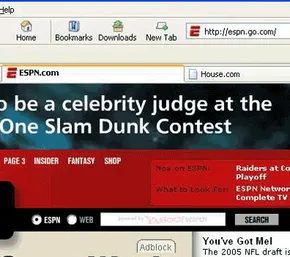

Tabs. Pop-ups. Privacy. Extensions.
These aren’t just buzzwords. They’re the reason Firefox survived the early 2000s browser wars. When Firefox first dropped, it felt like a slap in the face to Internet Explorer 6.
IE6 forced you to open a new window for every single site. You wanted a news article? New window. You wanted email? Another window. Suddenly, your taskbar was a mess of overlapping rectangles. Your RAM was choking. It was chaotic.
Firefox fixed this with tabbed browsing.
You kept one window. You opened multiple sites inside it. Click a tab to switch. It was simple. It was efficient. And because it worked so well, everyone else copied it. Chrome, Safari, Opera, even IE itself eventually added tabs. Firefox didn’t just innovate; it standardized the modern web experience.
Blocking the annoying stuff
If tabs were the feature that drew you in, the built-in pop-up blocker was the one that kept you sane.
Remember those little windows that spawned out of nowhere? The ones with flashing banners and “You Won a Prize!” screams? Firefox blocked them by default.
You could configure it, too. Want to be notified when a pop-up is stopped? Sure. Want to let pop-ups through for a specific site that actually needs them (like a login window or a bank portal)? Done. It gave you control instead of forcing you to endure the noise.
Cross-platform survival
Most software in the 2000s was Windows-centric. Firefox refused to play that game.
It was a cross-platform application from the jump.
It ran on Windows (98 and up, which was generous at the time). It ran on Mac OS X. It ran on Linux. This mattered because users weren’t monolithic. If you switched computers, your browser went with you. That kind of portability was rare. It built trust.
The private browsing shift
By 2009, Firefox 3.5 arrived. It wasn’t a huge visual overhaul, but it added a feature that has become essential: Private Browsing.
Before this, leaving a computer meant leaving a trail. History, cookies, form data. Private Browsing stopped the browser from recording any of that. Search history? Gone. Identifiable session data? Ignored.
If you didn’t want full private mode, there was also the “Forget this Site” option. Erase traces of a specific source without nuking your entire history. It was a pragmatic solution to a growing privacy problem.
The extension ecosystem
Here’s the thing about Firefox extensions. They are the reason the browser never felt stagnant.
Think of it as the “unlimited wishes” trope. You get a basic browser. Then you realize you can add almost anything. Want a password manager? Add it. Need a better ad blocker? Install it. Want to change the entire color scheme? Done.
The core program stays small. Lean. But the extensions layer on top, growing daily. New features appear constantly, created by developers worldwide. You only add what you need.
This modular approach kept Firefox relevant long after its initial hype faded. It wasn’t just a product. It was a platform.
And while other browsers eventually copied tabs, blockers, and private modes, the extension culture remained distinct. Chrome has its own store. Edge has its own. But Firefox’s approach to letting users curate their own toolset set a precedent.
It proved that a browser doesn’t need to do everything out of the box. It just needs to let you decide what it does.
The question now is whether that freedom still matters in an era of walled gardens. Or if we’ve just gotten used to being given what others think we need.
Hard to say. But for a long time, Firefox gave us the keys.
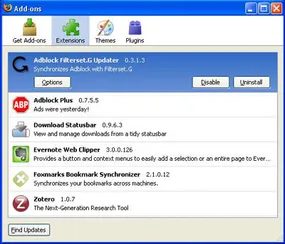

Most people don’t need a stock market ticker running in their junior high history class. It’s clutter. And let’s be honest, serious researchers probably don’t need an MP3 player embedded in their browser window. But if there is a specific feature you loved in Chrome, Safari, or Edge, you can almost certainly get it working in Firefox. Someone has likely already built an extension to bridge that gap.
This isn’t magic. It’s a direct result of Firefox being open source.
The Open Source Advantage
When you hear “open source,” you might think of complex code that average users ignore. But for developers, it’s an open door. The Firefox codebase is available for anyone to examine, modify, and use.
Mozilla goes a step further. They provide the developer tools for free. Anyone with a basic understanding of web technologies can build an add-on. This lowers the barrier to entry significantly. You don’t need a team of engineers. You just need an idea and the willingness to follow the documentation.
Where to Find and Install Add-ons
So where do these extensions live? The primary hub is the Firefox Add-ons website. It serves as the official directory for all approved extensions.
- Search functionality : Use the search bar to find specific tools.
- Categories : Browse by productivity, privacy, design, and more.
- Permissions : Each extension clearly lists what data it needs to access.
How Extensions Enhance Your Workflow
Extensions transform a generic browser into a specialized tool. Consider privacy. Firefox’s default protections are strong. But an extension like uBlock Origin adds a layer of control. It blocks trackers and ads before they load. This speeds up page loads. It also reduces bandwidth usage.
For developers, tools like Firebug (now integrated as built-in dev tools) or RESTClient extensions allow for faster API testing. You don’t need to switch applications. You stay in the browser. Context switching kills productivity. Extensions keep you in the flow.
“If there is a feature you like in another browser, chances are someone has made an extension to bring it to Firefox.”
Security and Trust
Not all extensions are created equal. Some are maintained by Mozilla. Others are from independent developers. The review process is strict. Mozilla checks for malicious code. But it’s not foolproof.
Always check the permissions. If a simple calculator extension asks for access to your browsing history, delete it. The risk is real. Extensions can execute JavaScript on any page. That’s a powerful capability. Used responsibly, it’s convenient. Used maliciously, it’s a privacy nightmare.
The Ecosystem Continues
The library is vast. Thousands of add-ons exist. Each one solves a niche problem. From grammar checkers to screenshot tools. From password managers to ad blockers. The variety is overwhelming if you don’t know where to look.
Next, we’ll look at some specific examples. You’ll see how these tools actually function in real-world scenarios. Not just theoretical benefits. Actual usage.


Most people think of Firefox add-ons as utility belts. You install something to block ads, maybe something to save passwords. But the ecosystem is weirdly diverse. It ranges from genuinely useful tools to completely absurd novelties. One extension redefines “cookies” in the settings menu as “delicious delicacies.” Cute, sure. But not helpful.
Then you have the tools that actually change how you interact with the browser. Here are four that stand out from the noise.
Mouse Gestures for Power Users
Opera had it first. Mouse gesturing. It’s an older concept, but Firefox extensions brought it back with a vengeance.
Gestures is the go-to for this. You hold the right mouse button. Then you drag the cursor in specific directions. It’s muscle memory once you get it.
- Drag left. Go back one page.
- Drag right. Move forward.
It’s faster than clicking the tiny arrows in the toolbar. You can also combine movements. A down-then-left drag? That minimizes the window. You can map almost anything. If you spend hours navigating complex sites, this saves seconds. Those seconds add up.
Media Control Without Leaving the Tab
FoxyTunes is for the media hoarders. It drops a tiny control panel right onto the Firefox toolbar.
The idea is simple. You’re listening to music. You’re browsing the web. You don’t want to switch tabs to skip a track. This extension lets you control any installed media player directly from the browser.
No app switching. No lost context. Just pause, play, next. It keeps the workflow tight.
Weather at a Glance
We all check the weather. Doing it involves opening a new tab, navigating to a site, and reading a page. That’s friction.
ForecastFox removes the friction. It puts a short-range forecast in your toolbar.
You pick your location. You can add several if you travel. You choose the length of the forecast. Daytime only? Both days and nights? The extension handles the rest. It’s a quick check. No full-page load. No ads interrupting your morning routine.
Context Menus Done Differently
Right-clicking on a webpage usually spawns a boring drop-down list. Text. Lines. Options.
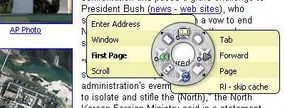
RadialContext changes the geometry. Instead of a linear menu, you get a dial.
Think of car stereo controls. Or a pie chart. The options are arranged in a circle around your cursor. It’s graphical. It’s distinct. You click the segment you need.
It’s not just aesthetic. It’s different. If you’re tired of the standard context menu, this offers a new way to interact.
These aren’t just decorations. They’re workflow adjustments. Some are about speed. Others are about interface. All of them show that Firefox can be shaped to fit your habits. Not the other way around.

Beyond the built-in blocker
Firefox ships with a native pop-up shield. It handles the most egregious interruptions. But if you want to go deeper, you need something more aggressive. Enter Adblock Plus.
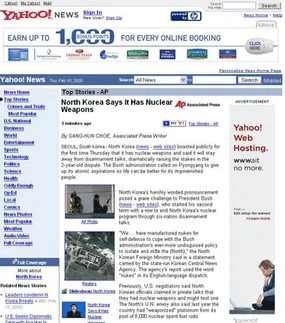
It is just one of many extensions designed to strip the web of clutter. The core function is simple: block banner ads and other visual noise. Some tools rely on static lists of known ad servers. They kill traffic before it loads. Others use domain heuristics, looking for words like “banner” or “adserver” in the URL. If it looks like a billboard, it gets blocked.
But the real power lies in the manual override. You do not have to accept a pre-set list. You can right-click any element you find obtrusive. The menu offers a simple command to remove it. Now that specific ad is gone. Forever. For that domain.
This approach shifts the burden from the developer to the user. You define what annoyance looks like. It is a direct response to the growing invasiveness of modern web design. Why should you endure a video playing in the sidebar? You don’t have to. The extension lets you curate your own experience. It turns the browser into a tool for focus, not just consumption.
Some purists argue that blocking ads hurts content creators. They have a point. But they rarely mention the cost of loading dozens of tracking scripts. The trade-off is explicit. You lose some revenue streams for sites. You gain speed and privacy. Most users find the balance acceptable. Especially when the right-click menu gives them total control.

You can ignore the silly add-ons. The Swedish Chef voice and Hammer Time sounds are fun for exactly ten seconds. The racing game in Xoom is a novelty. None of that matters for security. What matters is how Firefox 3.5 handles threats. It makes a hard choice. Security over functionality. Always.
Why Firefox Security Works Differently
Internet Explorer relies on security zones. Malicious software can sometimes confuse these zones. Firefox doesn’t use them. It also dropped digital signatures. Microsoft’s Peter Torr called this a major flaw. He argued that without signatures, you can’t verify if the vendor matches the program.
That argument is weak. Digital signatures don’t guarantee safe software. They just mean someone paid for the verification. Fraudulent signatures exist. They get issued. Ignoring them is smart.
ActiveX controls are the real differentiator. Internet Explorer includes them. They let websites download scripts or run small applications automatically. Firefox blocks them entirely. Some sites won’t load. That’s the price you pay. You lose functionality. You gain security. Firefox chooses the latter. Every time.
How Firefox 3.5 Enhances Protection
Firefox 3.5 added concrete defenses. It uses the favicon in the Awesome Bar. Click the small image to the left of the URL. It shows if the site’s identity is verified. This isn’t just decoration. It’s a verification tool.
The browser now includes anti-phishing and anti-malware protection. If you visit a site trying to install spyware, a Trojan horse, or a worm, Firefox warns you. It doesn’t just say “no.” It explains why. You get a reason. You can make an informed decision.
The Open Source Advantage
Firefox is open source. Anyone can see the code. This sounds dangerous. It gives hackers access. But it’s the opposite. More people want to fix bugs than exploit them. Thousands of eyes scan the code. Security flaws get patched quickly.
Mozilla even ran a bounty program. $500 and a t-shirt for finding a bug. This incentivized security research. It turned potential attackers into allies. The code is transparent. The fixes are rapid.
Firefox 3.5: What’s New in Performance?
Firefox 3.5 launched in June 2009. By September, over 220 million copies were downloaded. In the first 24 hours, it hit 100 downloads per second. That’s huge adoption.
The browser runs on the Gecko 1.9.1 rendering engine. A rendering engine interprets HTML or XSL and builds the page you see. Gecko 1.9.1 is faster. It has a cost. Compatibility dropped. Windows 98 and earlier are gone. Mac OS X before 10.3 is unsupported. The engine is newer. Older systems are left behind.
Fixing the Memory Leak
Earlier Firefox versions suffered from memory leaks. The browser consumed more RAM the longer it ran. Opening many tabs made it worse. Your computer slowed down. You had to reboot. Rebooting every day is annoying. It kills productivity.
Mozilla prioritized this. They used tools like BloatView, Leaky, and Trace Malloc to find the leaks. Firefox 3.5 introduced the XPCOM cycle collector. It finds unused memory and returns it to the system. The browser is lighter. It stays stable.
Integration and Compatibility
Mozilla tailored Firefox to each operating system. Windows, Mac, and Linux versions look native. They don’t look like foreign software. The style complements the OS. This isn’t just cosmetic. It reduces friction. Users feel at home.
Not all feedback was positive. Some users complained about missing extensions. Old add-ons didn’t work. But popular extensions usually get updated. Developers are working on new versions. The ecosystem adapts. It’s messy. It’s human.
What happens when the next engine update breaks your favorite tool? You wait. Or you switch. The choice is yours.
The Backlash and the Open Source Reality
Firefox isn’t just a hobbyist project anymore. It’s big enough to actually hurt.
As the browser gained serious market share, Microsoft felt the squeeze. The pressure forced them to pull Internet Explorer 7 and 8 out of the Windows box and release them as standalone updates. Industry analysts call this a direct response to Firefox’s success. Microsoft calls it a necessary patch for IE6’s gaping security holes.
With success comes scrutiny. Hackers started looking at Firefox. They found holes. Programmers patched them. Hackers found new ones. It’s an endless arms race, and it mirrors the exact mess IE was in.
There’s a psychological cost, too. Early adopters liked Firefox because it was the “other” option. It was different. Now? It’s mainstream. That novelty is gone.
Then there’s the code itself. It’s open source. Anyone can see it, tweak it, and release their own version. Some developers are already unhappy with Mozilla’s direction. They’re splintering off. We’ve seen alternate builds. They lack the stability of the official release, sure, but the potential for fragmentation is real.
“Removing all banner ads on Web pages doesn’t come built into Firefox — users have to install an extension.”
The Ad War and User Behavior
Firefox users block ads. A lot.
It’s a problem for the websites that rely on those clicks to keep the lights on. But don’t blame the software entirely. A survey showed Firefox users click on web ads less often. Is it because they’re using ad-blockers? Probably not. It’s because they’re just smarter about the internet.
The solution isn’t to stop Firefox. It’s for advertisers to stop making terrible ads.
You know the ones. The ones that mimic Windows error messages. The flashing, blinking, scrolling nightmares. Everyone hates them. They’re malicious, deceptive, and distracting. If you want people to look, stop shouting.
Also, keep in mind: blocking ads isn’t default behavior. It requires an extension. As Firefox grows, its audience gets broader. More non-technical users. They won’t dig for extensions. They won’t block ads. The impact might be less severe than critics fear.
What’s Next for Firefox?
Mozilla is moving fast. If you think Firefox 3.5 was the peak, you’re wrong.
Version 3.5 dropped in June 2009. It brought HTML5 support. It handled Ogg Vorbis and Ogg Theora. It added microformats and animated portable network graphics (APNG). These aren’t just features. They change how web pages function once fully adopted.
But the real buzz is around multitouch.
Multitouch interfaces are everywhere. Cell phones. Trackpads. Devices that sense multiple fingers at once. Mozilla is building an API for this. It lets developers create multifinger commands on the web. The first version to support this? Maybe Firefox 3.6.
Screenshots of Firefox 3.7 were already floating around by July 2009. Betas always shift, but the plan is clear. A see-through, glassy interface. Faster JavaScript. Better page loading.
And synchronization. Bookmarks syncing across devices. You can do this now with third-party plugins. But Mozilla is bringing it native.
“Tabs may have their own processing threads, which means that if one Web site open in your browser is having trouble, it’s less likely to force you to restart the entire session.”
That’s the Chrome influence. Tabs getting their own processing threads. If one site crashes, you don’t lose everything else. Just that tab.
Firefox 4.0 is set for October or November 2010. It’s borrowing heavily from the new kid on the block, Google Chrome. Interface changes. Speed. Stability.
The race isn’t over. It’s just getting started.
Digging Deeper into the Browser Wars
We’ve covered the mechanics of how browsers like Firefox operate, but the full picture requires looking at the ecosystem around them. This isn’t just about code; it’s about how users interact with the web, how developers build for it, and how security threats evolve.
Understanding the Landscape
If you are trying to figure out how internet search engines work, it’s worth knowing that browser choice often influences the default search provider. But beyond search, the infrastructure is complex. You need to understand how the internet infrastructure works to see why a browser like Firefox matters. It acts as the gateway, interpreting code, rendering visuals, and handling security protocols.
The history here is rich. From what’s new about Internet Explorer 7 to the shifts in Internet Explorer 8, the competition drove innovation. Microsoft’s dominance was challenged not by a single feature, but by a philosophy. That’s where what “open source” means becomes critical. Firefox wasn’t just a product; it was a community project. This openness allowed for rapid auditing and a different approach to how computer viruses work versus how spyware works.
Why Privacy Matters More Now
One of the most significant shifts in user behavior involves advertising. Studies have shown that Firefox users ignore online ads, a trend that highlights a growing discomfort with how web advertising works. Users are becoming more selective. They want control.
This control extends to security. Vulnerabilities in older versions, like the Firefox 3 vulnerability, remind us that no software is perfect. The challenge is how to trust Firefox when patches roll out. The Mozilla Foundation’s approach to handling Mozilla security bugs is transparent, but users need to stay informed.
The Future of Interaction
Looking forward, the integration of new input methods is key. With Firefox’s coming multitouch support, the way we interact with the web is changing. It’s not just about clicking anymore. It’s about gestures, swipes, and a more natural interface. This ties into the broader question of how web pages work in a mobile-first world.
The download stats tell a story of adoption. Firefox 3.5 soared past a million downloads, approaching a rate of 100 downloads a second at its peak. That wasn’t just luck. It was a result of community efforts like SpreadFirefox driving awareness and the official Firefox site providing a reliable destination for updates.
Resources for the Curious
For those who want to go deeper, the Mozilla Developer Center offers extensive documentation on the Gecko rendering engine. Understanding how web pages work at a technical level can help you appreciate the complexity behind every site visit.
If you’re interested in the business side, sources like Net Applications and W3Schools provide historical browser statistics. These numbers contextualize the rise and fall of various browsers. It wasn’t just Firefox and Internet Explorer. It was a dynamic, shifting market.
Final Thoughts
The story of web browsers is still being written. From the early days of how the Internet started to the current era of touchscreens and open-source collaboration, the tools we use shape our experience. Knowing how Google works or how computer viruses work gives you agency. You’re not just a passenger. You’re a participant.
The links below point to further reading, but the real education happens when you start questioning how your browser handles data, displays content, and protects your privacy. The tools are there. The knowledge is accessible. The rest is up to you.