Everyone assumes the internet is for buying things. It’s not. At its core, the web is two things: talking to people and finding out stuff. We use it to send emails, shoot instant messages, and dig through the World Wide Web for answers to work problems or weekend plans.
But there is an older layer to this. A layer built for pure conversation.
It’s called newsgroups.
Think of a newsgroup as a continuous, public bulletin board for a specific topic. You don’t post into the void. You join an existing stream. Hundreds, sometimes thousands, of people are talking simultaneously. You drop in. You read. You reply. You leave.
This system didn’t appear from nowhere. It started in North Carolina in 1979. Two Duke University students wired computers together. Their goal was simple: exchange information with other UNIX users. They weren’t trying to build a commercial empire. They just wanted to share data.
Down the road at the University of North Carolina in Chapel Hill, another student wrote the software to distribute that information. These three students created the foundation. They built what we now call Usenet.
Usenet is the grandfather of the social web. It predates Facebook. It predates Twitter. It predates even the commercial web as we know it.
In this look back, we’ll separate newsgroups from other electronic communications. We’ll explain how they actually work. We’ll show you where to find them today. And we’ll tell you how to subscribe if you still want to.
Choosing the Right Channel for Digital Communication
You likely juggle several communication tools daily. They aren’t interchangeable. Each serves a specific purpose, from the asynchronous nature of email to the real-time urgency of voice calls. Knowing which tool fits the job saves time and reduces friction.
Email: The Standard for Asynchronous Exchange
Email remains the backbone of digital correspondence. It allows direct messaging to individuals or groups. Messages can be brief or lengthy. You can attach files or quote previous text. It is most effective when:
- Immediate responses are not required.
- You are targeting a specific person or defined group.
- You know exactly who you are contacting.
- You need to share extensive documentation or files.
Chat: Real-Time Group Interaction
Chat happens in shared spaces called chat rooms. Software displays typed messages to everyone in the “room” simultaneously. You can find these spaces on platforms like America Online or sites like TalkCity.com. Use chat when:
- You need instant answers.
- Multiple people need to see the conversation.
- Information fits into brief, rapid-fire messages.
- You want to network with new acquaintances.
Instant Messaging: Personal Real-Time Contact
Instant messaging blends email and chat. You maintain a list of contacts. You can only message those who are currently online. A small window opens for two-way typing. It works best when:
- You require immediate feedback.
- Communication is limited to one person or a small circle.
- You know the recipient.
- Real-time interaction is necessary.
Newsgroups: Decentralized Public Discourse
Newsgroups host ongoing public discussions on specific topics. They are decentralized. Messages replicate across hundreds of servers globally rather than sitting on one machine. This makes them ideal when:
- Delayed responses are acceptable.
- You are speaking to a broad audience.
- The audience shares a specific interest.
- You need to provide detailed, extensive information.
Forums and Discussion Boards: Centralized Communities
Forums resemble newsgroups but differ in architecture. They typically reside on a single server controlled by the owner or originator. This centralization allows for easier moderation and community management. Use forums when:
- You do not need an instant reply.
- You want to join a dedicated community.
- You are discussing a niche topic with others.
- You wish to contribute detailed insights or long-form content.
Listservs: One-Way Broadcasts
A listserv is essentially a broadcast email system. Registering for a newsletter, like the HowStuffWorks newsletter, puts you on a listserv. Information sends to everyone on the server list. The key distinction: listservs are not interactive. Participants receive but do not reply to the group. They are best for:
- Receiving regular updates without needing a reply.
- Getting curated information on a specific subject.
- Consuming content from a group of experts or peers.
Conferencing: Multi-Modal Real-Time Collaboration
Conferencing tools, such as Microsoft Netmeeting, act like enhanced chat rooms. They support real-time text, audio, and video. You can share a whiteboard or screen. This software is effective when:
- You need immediate interaction.
- Multiple participants are involved.
- You need to share files or visual aids like a whiteboard.
- Text alone is insufficient to convey complex ideas.
Video Communication: Visual Presence
Video calls require fast connections, like cable or DSL, paired with a webcam. While less common than text-based tools, adoption grows as bandwidth improves. Video is optimal when:
- You need to see facial expressions or visual cues.
- You must demonstrate something visually.
- Both parties have high-speed internet access.
IP Telephony: Voice Over Internet Protocol
IP telephony treats the internet like a traditional phone line. Users need a computer, internet connection, and specific software. Some services, like Net2Phone, bridge the gap, allowing you to call standard phones directly. This technology shines when:
- You need an immediate verbal response.
- You have the necessary hardware (microphone, speakers).
- Spoken language is clearer or faster than typing for the topic at hand.
The choice ultimately depends on urgency, audience size, and the complexity of the message. Text offers permanence. Voice offers immediacy. Video offers presence. Pick the tool that matches the need.
The Client Software Reality
Let’s be clear about the mechanics: most of the methods discussed previously demand that you install actual client software on your machine. It’s not purely web-based magic; you need a dedicated app running locally.
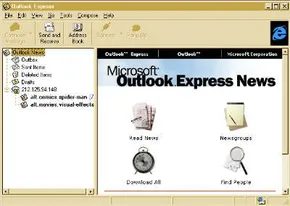
In the majority of cases, this software isn’t a paid, standalone product. It’s either free or, more commonly, bundled as a feature within a larger application. Think of the late 90s browser wars. Netscape Navigator didn’t just serve web pages; it included a newsgroup reader client. Microsoft followed suit with Internet Explorer and Outlook Express. These weren’t just for email or surfing the web. They had built-in tools to subscribe to newsgroups.
This integration lowered the barrier to entry. You didn’t need to hunt down a separate Usenet client. The software was already there.
We’ll dive into the specifics of subscribing to these groups later. For now, just remember that access usually meant having the right client installed.

The Vocabulary of Usenet: Decoding the Jargon
You can’t navigate the older corners of the web without understanding the lexicon. Newsgroups have their own dialect, a shorthand born from decades of asynchronous communication. If you’re diving back into this space, or just curious how it all works under the hood, you need to know what these terms actually mean in practice.
Usenet is the umbrella term for the entire system of distributed discussion forums. Think of it as the original social network, minus the algorithmic feed and the advertisers. It’s an exchange platform where messages propagate across a network of servers.
When you look at the flow of information, you’re looking at a Feed or Newsfeed. This is the stream of messages moving from one server to another, or finally dropping into your client. It’s the lifeblood of the system. Without the feed, the newsgroup is just an empty shell.
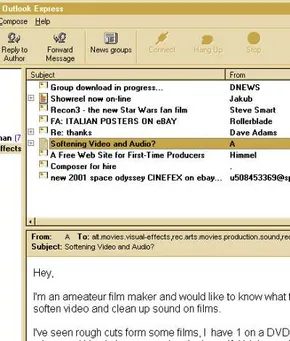
Posting is the act of contributing. You enter a message, and it becomes a Post or Article. These aren’t just static blobs of text; they’re part of a Thread or threaded discussion. A thread starts with an initial post and branches out as replies accumulate. It’s a conversation frozen in time, preserved for anyone who cares to dig into the archives.
Hierarchies and the Big Eight
How do you find anything in such a sprawling mess? Through Hierarchies. The name of a newsgroup is its address, structured from general to specific. Take comp.lang.java.programmer. It tells you exactly where you are: the computer category, under languages, specifically for Java developers. It’s a logical taxonomy that predates modern tagging systems by decades.
This structure stems from the Big Eight. Usenet started with eight main categories:
- comp (computers)
- humanities
- misc (miscellaneous)
- news (current events)
- rec (recreational)
- sci (science)
- soc (social)
- talk (general discussion)
It’s ironic that alt (alternate) ended up becoming the largest and most chaotic category. It wasn’t part of the original eight. It was the dumping ground for everything that didn’t fit the academic or professional mold, and it grew wildly out of proportion.
Moderation and the Art of the Flame
Not all groups are lawless. Some are Moderated. Here, a gatekeeper reads every submission before it hits the main board. They can reject posts they deem inappropriate. It’s slower, but it usually keeps the noise down.
Most groups are Unmoderated. You post, it appears instantly. This is the default for the vast majority of Usenet, offering raw, unfiltered discourse. It’s where the good ideas and the bad ideas collide head-on.
And when they collide? You get a Flame. That’s just a polite term for a harsh criticism or an angry rebuttal. It’s inherent to the medium. You can’t have heated debate without the occasional flame war.
The Infrastructure: Servers and Protocols
Behind the scenes, a News server stores the archive. It’s the librarian holding the books. To get data off that server, you rely on the Network News Transfer Protocol (NNTP). It’s the standard language for transmitting newsgroup messages over the Internet. In some older or more specialized setups, you might still see UNIX-to-UNIX Copy Protocol (UUCP) used for direct connections between UNIX servers, but NNTP is the dominant player today.
Your Client: Online vs. Offline
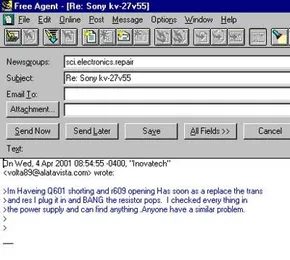
How you read these messages depends on your Newsreader. This is the client software you use to view posts. It’s often bundled with email clients, but standalone apps exist too.
You have two main modes of operation:
- Online : The newsreader keeps a live connection to the server. It’s real-time, but it ties up your connection.
- Offline : This is the pragmatic choice. You connect briefly to download new messages from your subscribed groups, then disconnect. You read, write replies, and queue them up. When you’re ready, you reconnect to send them out.
Most power users prefer the offline mode. It’s faster, it respects your bandwidth, and it lets you compose


How Usenet Servers Keep the Peace
Usenet doesn’t work like a chat room. It’s a distributed system that starts on one server and bloats out to hundreds, sometimes thousands, of machines. The infrastructure relies on news servers running special software. Each one maintains a dedicated file for every newsgroup it carries.
When you check in, here is the mechanical reality of what happens next:
Your client uses the Network News Transfer Protocol (NNTP) to talk to the server you configured. Usually, your Internet Service Provider (ISP) gives you these details. If they don’t support news feeds, you have to hunt down a public server list yourself.
Once connected, your newsreader pulls down every new message from the groups you subscribe to. If you write something, the reader sends it back. Offline clients have to reconnect via NNTP first to push those drafts into the system.
The server saves your post by appending it to the end of a massive text file. Newsgroup files are just plain text. They grow. When they hit a size limit or a time threshold, the oldest entries get moved to a newsgroup-archive text file. The active file stays lean.
Then the real work begins. The server reaches out to neighbors using NNTP or the older UUCP protocol. It doesn’t just overwrite its data. That would be catastrophic. If Server A sends its full file to Server B, and Server B overwrites its own, any messages posted locally in the meantime are gone.
Instead, the servers compare their files. They look for differences. They extract the new postings and merge them into the local database. Then they send that combined, updated file to other servers. This replication loops until every node has the latest info. For popular groups, this sync is nearly continuous.
Eventually, other subscribers read your post along with everything posted since their last visit. They reply. You see the replies. The cycle repeats.
Making Headlines
The structure above is why Usenet feels different from modern forums. There is no central admin deleting posts. There is no algorithm prioritizing content. Just servers syncing text files across the globe.
This architecture has consequences. It makes censorship difficult. If a message exists on one server, it will eventually exist on thousands. It also means bandwidth costs. Downloading entire newsgroup files, even in partial sync, consumes data.
Users who value persistence often prefer this over ephemeral social media feeds. The content stays. The archive holds it. The server keeps it.
You don’t need a powerful computer to run a newsreader. A basic connection works. The heavy lifting is done by the servers behind the scenes. They do the comparing. They do the merging. They keep the peace through repetition.
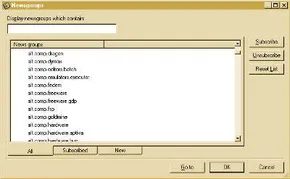

You’ve got the basics of what newsgroups are. Now you need to know where to find them and the mechanics of subscribing. Usenet itself hosts a massive directory of these groups, alongside general guides, but you’ll need a client to actually interact with the data.
Connecting to a News Server
The first hurdle is technical: you need the name or IP address of your ISP’s news server. Not every Internet Service Provider runs their own. If yours doesn’t, you can pivot to a list of publicly accessible news servers.
Your newsreader software handles the configuration. Older clients like Outlook Express use a wizard that walks you through adding the server details. It’s a straightforward setup.
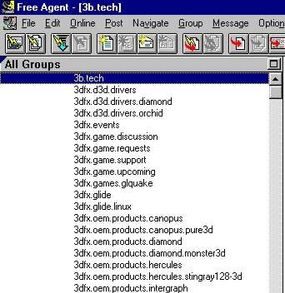
Once configured, the client pulls the list of groups available on that specific server. Keep in mind that no single server carries every group in existence. Operators curate their lists, though they often add popular requests if there is enough demand.
Subscribing and Reading
You pick the groups that matter to you and hit Subscribe. Most modern readers include search functions to help you filter through thousands of options to find niche interests.
After subscribing, your reader displays the selected groups. The reading experience depends on your client type. An online reader might show messages instantly when you click a group name. An offline reader requires you to manually download the articles before you can view them.
The Process of Creating a New Group
You can also create your own newsgroup. It’s not instant. The process involves community consensus and voting.
1. Request for Discussion (RFD)
Start by posting an RFD to news.announce.newgroup. It’s also wise to post this to related existing groups. The post must describe the group’s purpose, propose a name, and list the intended categories.
For example, if you wanted a group dedicated to the ethics of creating spider-goats, you might propose: alt.animals.ethics.spider-goat.
2. The Discussion Phase
Other users read your RFD. They comment, criticize, and suggest changes. This phase typically lasts about a month. If consensus isn’t reached, the discussion often moves offline to email.
3. Call for Votes (CFV)
Once the discussion settles, you post a Call for Votes (CFV) to news.announce.newgroup and related forums. This vote remains open for 20 to 30 days. Subscribers cast their votes.
After the voting period closes, moderators in each affected group count the results. These results are posted back to news.announce.newgroup. A mandatory five-day window follows for counting verification and corrections.
4. Approval Criteria
Your new group is only created if three specific criteria are met:
* At least two-thirds of the votes must be in favor.
* The affirmative votes must outnumber the negative votes by at least 100.
* There can be no serious, demonstrable objections to the creation.
If you pass these hurdles, the new group is announced and ready for posting.
Why Use Newsgroups?
Newsgroups will never replace email or chat rooms for quick, real-time communication. They serve a different purpose. They are invaluable resources for specific information retrieval or troubleshooting complex problems. The variety of topics is vast. There is likely a group for almost any niche interest.
Frequently Answered Questions
What is the difference between Usenet and a newsgroup?
Usenet is the underlying network infrastructure that allows users to post and read messages. A newsgroup is a specific topic-based community within that network.
Why do we use newsgroups?
They function as discussion groups on the Usenet network. Usenet is a global system of servers communicating via the Network News Transfer Protocol (NNTP). Groups are organized hierarchically, with names indicating their specific topics.
How are Internet newsgroups organized?
They are categorized by topic. Each newsgroup focuses on a specific subject matter, making it easier to find relevant discussions.
Lots More Information
Related HowStuffWorks Links
- How E-mail Works
- How Instant Messaging Works
- How The Internet Infrastructure Works
- How Web Servers and the Internet Work
- How Firewalls Work
- How Modems Work
- How Cable Modems Work
- How DSL Works
- How Home Networks Work
- How Telephones Work
More Great Links
- Usenet
- Learn The Net: All About Newsgroups
- Learn The Net: Searching Newsgroups
- Learn The Net: Joining Newsgroups
- Forte’ Inc: FreeAgent
- Newzbot: Sorted List of Public Newsgroup Servers
- Newsgroups Software And Services
- NNQ: What Newgroups Are And How They Work
- Electronic Discussion Groups and Internet Newsgroups
- Learn The Net: Netiquette