Changing your phone should be fun. Usually not. Common headaches include lost contacts, lost photos, and the fear that your new device will break due to poor installation. Wondershare MobileTrans exists to eliminate this pain. It has established itself as the lever that moves your digital life from one pocket to another.
This software can handle the messy reality of data transfer. Transfer contacts, messages, photos, videos and even call logs. It works across borders. From iOS to Android. From Android to iOS. It does not care about proprietary file formats. The goal is simple. Eliminate the friction between different ecosystems.
Why this tool is important for everyday users
You might be wondering why you need a desktop app for this purpose. Can’t you just use cloud backups? Cloud backup is slow. They rely on unreliable Wi-Fi. Data types such as application data or certain threads are often ignored. MobileTrans provides a direct bridge.
The most important thing is control and speed.
- Cross-Platform Freedom: Use Windows or macOS. The software supports both.
- Wide device support: Communicate with Apple, Samsung, Huawei and Xiaomi.
- No technical degree required: Clean interface. You don’t need to be an administrator.
“Wondershare MobileTrans offers a customized solution to today’s data mobility challenges with a focus on security and ease of use.”
This is important because your data is your digital footprint. Losing it during the exchange process creates a security risk. It is also a time sink. The software stabilizes the process. This takes the guesswork out of compatibility.
Install on your computer
Downloading is easy if you’re careful. Go to trusted sources. Select the appropriate version for your operating system. An installer is available for Windows users. macOS users get a disc image.
The process is quick.
- Download the file.
- Run the executable or mount the disk.
- Follow the instructions on the screen.
No complicated settings are required. Normal system administrator rights are usually sufficient. This site is guaranteed to be genuine. You don’t get bundled bloatware. It is clean.
How the connection works
Here is the catch. MobileTrans is not an app that you install on your phone. There is no native version for Android or iOS. There is no Linux version either. It exists on your computer.
It is used as a bridge.
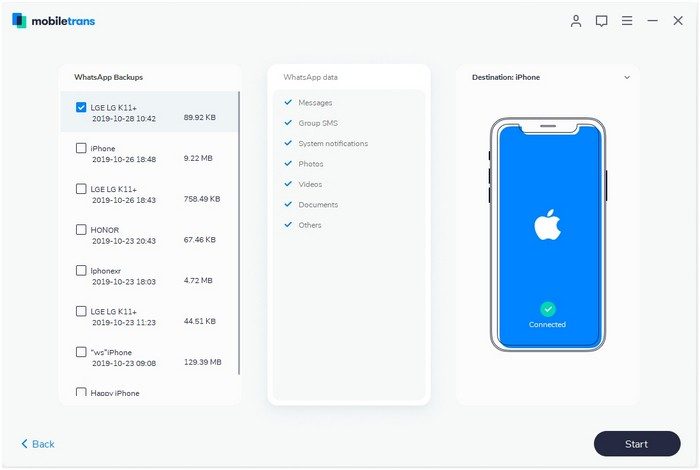
Connect your smartphone via USB. The software detects your device automatically. The user interface adapts to moving content.
*Phone to Phone: Direct transfer.
* Phone to PC: backup or restore.
This architecture guarantees stability. This avoids sandboxing restrictions for apps trying to read data from other apps that mobile operating places on
Compatibility and security
Does it work with your phone? Probably so.
This software covers most devices currently in circulation. Supports the latest versions of iOS and Android. You can transfer data between different brands without formatting problems.
This is very important for safety. You don’t need to rely on third-party cloud servers to store private photos during transfer. Move them directly. For business users with multiple endpoints, this means consistent and secure backup. For the average user, this means setting up a new phone in minutes instead of days.
It removes the fear of loss. You keep your history. You retain the memory. The transition becomes invisible.
But good technology is only as good as connectivity. Make sure the cable is OK. Make sure the ports are clean. The software handles the logic. You handle the physical link. Now all you have to do is wait for the bar to fill up.
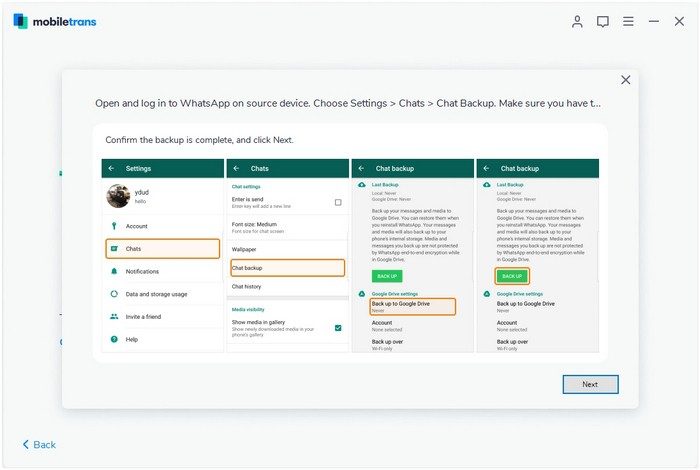

MobileTrans does more than just transfer data. It’s a toolkit for managing your digital life. This software allows you to completely clone your phone. You can backup everything to your computer. You can also restore specific files from older backups. This level of granularity is important. Gives real control to users, especially experts.
License structure and pricing model
Cost is the first hurdle. There is a free trial version. Show what the software can do. But it limits the volume. Large amounts of data cannot be transferred freely. A paid license is required to unlock all content.
The options vary. Available for purchase monthly. Annual plans are common. Permanent license available. These are for people who don’t like subscriptions. Student discounts are rare. There are promotions, but they are temporary.
Companies and IT professionals have different needs. They need to clone devices quickly a device. Managing a large number of phones requires speed. MobileTrans can solve this problem. Support is reactive. There is no official certificate. But Wondershare provides a guide. These resources help your team work faster.
Version history and legacy compatibility
The software is constantly evolving. There will be frequent updates. Stay up to date with iOS and Android changes. The latest version is always available on the official website. However, some users need older versions.
Why go back? Compatibility. Older devices may not be able to run the new code. Alternatively, the feature may have been removed. For these reasons, users look for older versions.
Please proceed carefully. Downloading old versions poses a security risk. Only get it from official support. Documentation is a sure bet. Avoid third-party mirrors. Incompatibility can disrupt workflow.
Security protocols and data integrity
Information security is not an afterthought. It is the center. Wondershare uses advanced security protocols. Your personal information is kept private.
The transfer takes place locally. Data is not sent to third-party servers. This eliminates the risk of cloud storage. No leaks. No unauthorized access.
Update and patch vulnerabilities regularly. This makes MobileTrans more reliable. Suitable for individual users. It works for organizations. Confidential information remains safe during device changes.
Support infrastructure and user support
Help is available. Before you buy. After purchase. The online documentation is comprehensive. The FAQ section is great.
Customer service can be reached directly. Email support is available. Chat support is available with certain licenses. Issues range from installation errors to issues with advanced features. Support helps you get the most out of your tools.
This approach is comprehensive. It positions MobileTrans as a safe choice. Downloading data transfer software requires trust. Wondershare builds this trust with support and security.
The ecosystem surrounding the software is very tight. Updates stay current. Security keeps you safe. Support keeps it usable. What happens when the next major OS update is released? This cycle repeats itself.
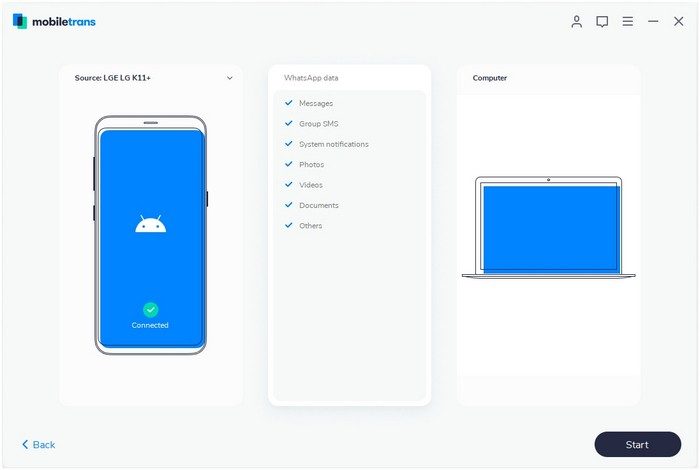
You don’t need a server farm to switch from one phone to another. All you need is a cable and a little patience. Wondershare MobileTrans works on a simple premise. This means that you store your data on your computer instead of being unmanageable in an undefined cloud storage space. This is the preferred approach for the desktop. You can connect your Android or iOS device via USB. The transfer takes place locally. Nothing has been uploaded. No downloads from remote servers. Just raw data moving across a wire.
This is important because privacy is not just a tech buzzword. This is a requirement for anyone who has ever worried about who sees their messages. By keeping the process on-site, MobileTrans avoids the delays and security risks associated with cloud-based transfer tools. You don’t have to wait for a slow internet connection to finish uploading your photo gallery. You don’t want your service provider to see your text message history.
User interface and workflow
The software doesn’t try to be smart. Use the graphical user interface to guide you step by step through the process. No need to remember complex terminal commands. Driver issues do not need to be fixed during the migration process. The assistant handles the heavy lifting.
Supported data types are standard but include We are talking about contacts. SMS and MMS logs. Call history. Photos and videos. Application information varies by platform, but is included if supported. This covers the essentials of the latest smartphones. If you’re switching from an old iPhone to a new one, or upgrading from an Android phone to a newer model, this covers most of the things you really care about.
The user interface is multilingual. Supports French, English and other languages. Works on 64-bit Windows and macOS environments. Standard desktop settings work fine. Requires a USB port. You need disk space on your computer for local backup files. that’s it.
License and right to use
Wondershare offers a trial version. You can test the basic functions. If you like what you see, you pay. The commercial license unlocks the entire set of modules. They also prioritize support. You don’t have to rely solely on FAQ pages and email tickets.
Internet access is still required, but is only used for certain tasks. Required to download the installer. Required to activate the license. You need it to update. Once the software is running, the actual transfer can be performed offline. The backup file is located on your hard drive. You can restore it later without connecting to the Internet. This is an important distinction for users with limited bandwidth or who simply distrust constant connectivity.
Specifications and compatibility
This architecture is based on a desktop client. It acts as a bridge between your PC/Mac and your mobile device. The connection is wired. USB provides stability. Wireless communication can become unstable. Cables do not lose packets. This prevents large files such as videos from timing out during transfer.
Supported devices are smartphones and tablets. Android is covered. iOS is covered. This tool can handle both ecosystems. Whether you’re switching from Samsung to Google Pixel or iPhone to iPhone, it doesn’t matter. The logic is consistent.
Safety is built into the design. There is no default cloud service. Your data is not located on third-party servers. It’s on your computer. You can export it if you want to move it again. The format is local. This gives you full ownership of your data. No vendor lock-in. There are no proprietary formats suitable only for certain applications.
Why this matters to everyday users
Most people don’t think about where their data is until it’s gone. the panic sets in. Cloud backups are convenient, but often opaque. You don’t know when the last backup was. You don’t know what was actually saved. MobileTrans allows you to view these files. You control the whole process. You decide what moves.
The manual aspect can be a downside for some people. Requires a computer. Not everyone keeps their desktop running all the time. But for those who do, it offers a level of transparency that automatic cloud sync rarely does. You aren’t trusting an algorithm to pick what’s important. You are picking it yourself.
This software is classified as a utility. Especially mobile data transfer. This is a migration and backup tool. It is not suitable for photo editing or social media management. It does one thing very well: transfer data from point A to point B Fast. Secure. Local.
Language support is sufficient for French or English speaking users. Documentation is available online. Email and chat support is provided for higher level licenses. The system requirements are low enough to run on almost any modern computer.
Compliance system
Just because you’re in the cloud doesn’t mean you get a free pass.
If you think moving your data to AWS or Azure absolves you of responsibility, you’re wrong. Shared responsibility is the rule, not the exception. The service provider protects the infrastructure. You secure what you put in there. This difference is not just a legal jargon. This is the difference between a breach and a business.
Think about identity. Relying on static passwords alone is no longer enough. The attack surface for credential theft is too large. Multi-factor authentication (MFA) has shifted from a “nice-to-have” to a baseline requirement in any serious security posture. Without it, the front door you’re leaving the front door wide open.
Zero Trust: New default
The old model of “trust but verify” is dead. It depends on strong perimeter. A distributed workforce don’t exist. You can’t build a wall around your laptop on the subway.
Zero Trust assumes breach. All internal or external requests are authenticated and authorized. It doesn’t matter if the user is in the office or in a coffee shop. The system checks identity, device health and context before granting access.
This sounds expensive. It isn’t. It’s all about granularity. You stop giving everyone admin rights just because they have the same title. Only grant the access you need for a certain period of time, then revoke it immediately.
“Never trust, always verify.”
This principle also applies to data. in transit, the encryption is standard. But what about encryption at rest? This is where the rubber meets the road. Storing sensitive customer data without encryption at rest means rolling the dice every time the server restarts.
The Human Element
Technology solves about half of the problems. The other half is people.
Phishing is not going away. Email just got smarter. The text created by artificial intelligence is convincing. Your team needs training, but that they skip through. Realistic simulations are better. They develop muscle memory to spotting red flags.
an incident response plan is also required. The document is not on a shared drive. A living plan. Who calls who? How do you isolate an compromised node? What is communication protocol for customers?
When the alarm goes off, there is no time to figure out the chain of command. It must be written in advance. Tested. Understood
Compliance as a byproduct
GDPR, HIPAA, SOC 2. The acronyms pile up. But don’t think of compliance as a checkbox exercise. This reflects actual security hygiene.
If you have the doing security right, compliance will happen automatically. Collecting logs. Access is controlled. Data backup. The reports write themselves.
If you’re in a rush to meet a deadline because you ignored security until the audit, you’ve already failed. The framework exists to guide you, not limit you.
Start small. Select an area. Maybe an MFA. Maybe it’s encryption. Build from there. Don’t try to boil the ocean. Security is a journey, not a destination. And the destination keeps moving.