Most of us stare at screens until our eyes burn. It happens at work. It happens at home. It happens on the bus. f.lux addresses this specific exhaustion. It is not just another utility. It has become a standard for digital eye comfort across Windows, macOS, Linux, Android, and iOS. The software adjusts your screen’s color temperature based on the time of day. This aligns with chronobiology principles. The goal is simple. Reduce the negative impact of artificial light on sleep quality and eye health.
The science behind the warm filter
Traditional screens are calibrated for daylight. They emit bright blue light constantly. This light suppresses melatonin production. Your body thinks it is noon. Even when it is midnight. f.lux counters this with a sophisticated algorithm. It shifts the display toward warmer tones as the sun sets. The transition is gradual. There is no sudden jolt. This reduces exposure to blue light during evening hours. The result is a softer visual experience that supports your circadian rhythm.
Geolocation and sunrise/sunset synchronization
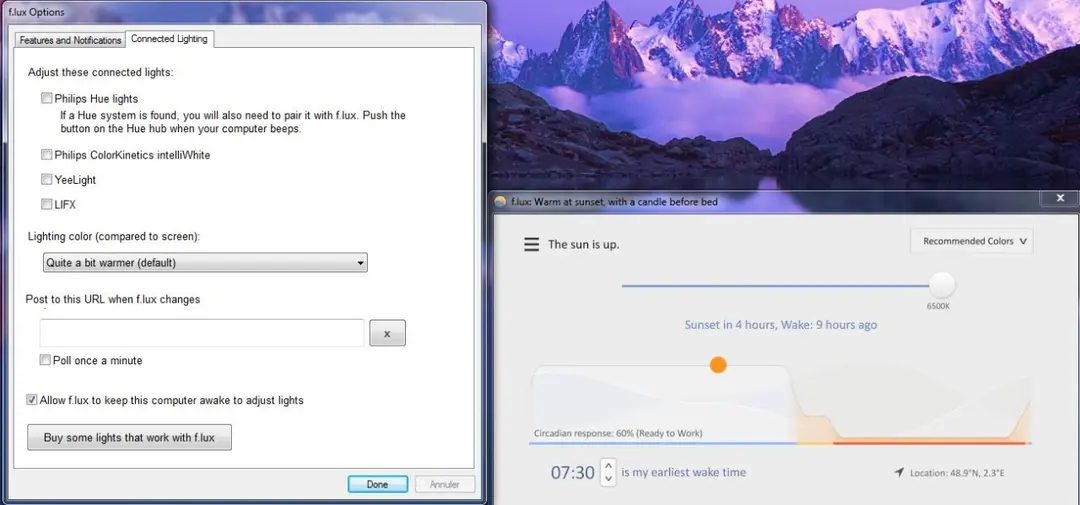
The tool relies on location data. You can provide your coordinates manually or enable geolocation services. This allows the software to synchronize screen color cycles with local sunrise and sunset times. When the sun goes down, f.lux applies a warm filter. It reduces blue light emission. This prepares your eyes for the evening. It creates a smooth transition into night mode. Most standard screens ignore ambient light. They remain fixed. f.lux changes that dynamic behavior.
Customization for different tasks
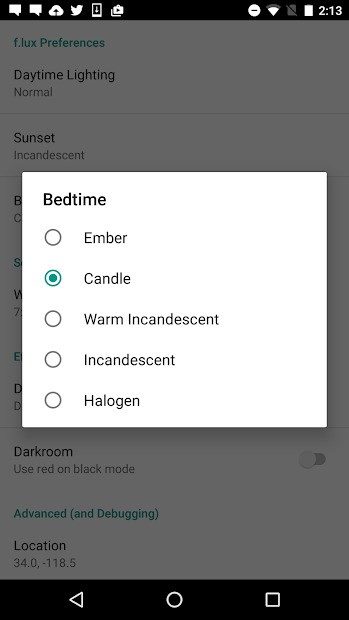
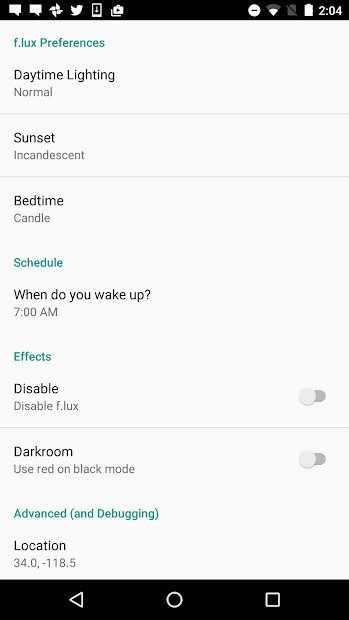
f.lux offers advanced personalization. Users can define separate settings for day, evening, and night. This adaptation fits individual preferences or specific professional needs. Photo editing requires accurate color representation. Extended reading benefits from reduced glare. Programming sessions often happen late at night. The software accommodates these variations. The interface is clean. It is straightforward. Installation takes only a few clicks. The initial setup guides you step by step. This accessibility makes it viable even for non-technical users.
Scientific backing and cross-platform availability
Studies support the benefits of reducing blue light in the evening. It lessens visual fatigue. It helps regulate sleep patterns. f.lux acts as a preventive measure. It combines ergonomics with medical insight. The transitions are gentle and customizable. This balance explains its widespread adoption. It runs on major operating systems without disrupting the user experience. The tool works quietly in the background. It adapts to your environment. It respects your biology.
The algorithm continues to evolve. New features may enhance precision. The core philosophy remains unchanged. Protect your vision. Protect your sleep. The screen should serve you. Not the other way around.
Most people know the feeling. You stare at a white screen until your eyes burn and your sleep schedule dissolves. f.lux fixes this by shifting your screen’s color temperature. It mimics the natural light cycle. Morning is cool. Night is warm. This isn’t just a gimmick. It aligns your digital life with your circadian rhythm.
Cross-platform support: Windows, Mac, and Linux
The real win here is accessibility. You don’t need a specific machine to use it. The software runs on almost everything. Windows users get full coverage. It works on Windows XP. It works on Windows 11. There is almost no gap.
Mac users are covered too. macOS compatibility is broad. It handles most current versions without a hitch. Linux isn’t left behind. There is a dedicated version. It might need a few extra steps to integrate perfectly depending on your desktop environment. But it works.
Mobile adjustments and security updates
What about phones? f.lux offers solutions for iOS and Android. iPhones and iPads get the treatment. So do Android smartphones and tablets.
There is a catch. Apple and Google restrict system access on some devices. Your experience might vary. You may need admin rights or specific permissions. It’s not always plug-and-play. But the developers keep updating the code. These regular updates fix bugs. They patch security holes. They keep the software compatible with new OS releases.
Safe downloads and installation steps
Where do you get it? Go to the official site. Or use trusted platforms like Futura. Avoid sketchy third-party mirrors. The installation is straightforward. It differs slightly by platform. But the steps are simple.
- Download the executable or package.
- Run the installer.
- Follow the on-screen prompts.
Once installed, don’t just leave it at default. Customize it. Your lifestyle is unique. Your screen habits are unique. Adjust the settings to fit your actual routine. This makes the tool effective rather than just installed.
Managing versions and updates
Sometimes you need an older version. Maybe you prefer the old interface. Maybe your hardware can’t handle the latest update. This happens.
If you need a legacy version, check the official archives. Use certified download platforms. Be careful though. Old versions can have security vulnerabilities. Outdated code is risky.
For staying current, f.lux has an internal update checker. Use it. It ensures you have the most stable version. It keeps performance high. It reduces bugs. Skipping updates might save time today but costs you in reliability tomorrow.
Licensing models and the free-tier reality
f.lux doesn’t cost a dime for personal use. You don’t need a credit card. You don’t need a student ID. The core features are wide open. This matters because most people just want to stop squinting at their screens without jumping through hoops. There are enterprise licenses for massive deployments, sure. But for you? It’s free. No “premium” tier with hidden gates. No upsell traps. Just download and go.
This transparency builds trust. In an era of subscription fatigue, that’s rare.
f.lux vs. built-in OS tools: Why choose a third party?
Your computer probably already has this feature. Windows has “Night Light.” macOS has “Night Shift.” So why install f.lux?
Because built-in tools are blunt instruments.
They turn the screen orange. Done. Simple. But f.lux offers granularity. You can tweak the intensity. You can set specific rules for specific apps. Need full color accuracy for video editing but warm tones for coding? f.lux handles that. It’s modular. It adapts to your workflow, not just the time of day.
Linux users have Redshift. Android users have Twilight. Both are decent. But they often lack the polish and depth of f.lux’s customization options. The support community for f.lux is also larger, meaning faster answers when things break.
Advanced automation and CLI control
For the power users, f.lux isn’t just a toggle. It’s a system.
You can create profiles based on the task at hand. Switch to a “neutral” color temperature for color-critical work. Hit a shortcut key to disable filtering instantly. It’s not just about eye strain. It’s about workflow integrity.
On Linux, there’s command-line control. This is huge. You can script it. Integrate it into your monitoring tools. Automate the dimming based on ambient light sensors. It fits into a DevOps pipeline or a home automation setup. It’s not just software. It’s infrastructure.
Documentation and community support
You won’t find a official certification for f.lux. Don’t look for it. It doesn’t exist.
But the documentation is thorough. It’s updated. It covers installation, troubleshooting, and those advanced scripting tricks. The forums are active. Real people help real people. If you’re on a weird hardware config or a niche OS version, someone has probably solved it before.
Video tutorials exist. Clinical studies on blue light are linked. The ecosystem is there to help you understand why you’re using it, not just how.
The ethical angle
There’s no advertising. No data harvesting schemes hidden in the code. The privacy policy is clear. This isn’t just about comfort. It’s about respecting the user.
As digital eye strain becomes a recognized health risk, tools like f.lux move from “nice-to-have” to “essential.” They align performance with biology. You work harder. You sleep better. All without paying a cent.
The question isn’t whether you need it. It’s whether you can afford to ignore the toll your screen is taking on your circadian rhythm.
You want to know if f.lux fits your setup before you hit download. The specs are straightforward, but they matter. This isn’t bloatware. It’s a utility that adjusts your screen’s color temperature based on your location and the time of day. No special hardware needed. Just standard OS capabilities.
Core Compatibility and Architecture
The software runs on almost everything that has a screen. If you are on Windows, you are covered. Versions range from XP all the way up to Windows 11. macOS users get native support. Linux distributions are included too, usually as a binary or package.
Mobile platforms aren’t left out. iOS covers iPhone and iPad. Android is supported as well. The architecture matches the platform. You get 32-bit or 64-bit versions depending on your OS. This ensures it runs efficiently without dragging down your system resources.
The installer is small. We are talking megabytes, not gigabytes. The footprint is minimal. On Windows, it’s a standard .exe file. macOS users get a .dmg image. Linux gets a binary or package manager entry. Mobile apps follow the standard distribution models for their respective stores.
Licensing and Usage Rights
Here is the catch. The software is free for personal use. It is freeware. You can download it, install it, and use it at home without paying a dime.
Professional use is different. If you are deploying this across a corporate network or using it commercially, you need a license agreement. The publisher, f.lux Software LLC, requires specific authorization for business environments. Check the terms if you are setting this up for a company.
Privacy and Local Configuration
You might worry about data. You shouldn’t. No account is required. f.lux does not force you to create a profile or log in. Your data stays on your machine.
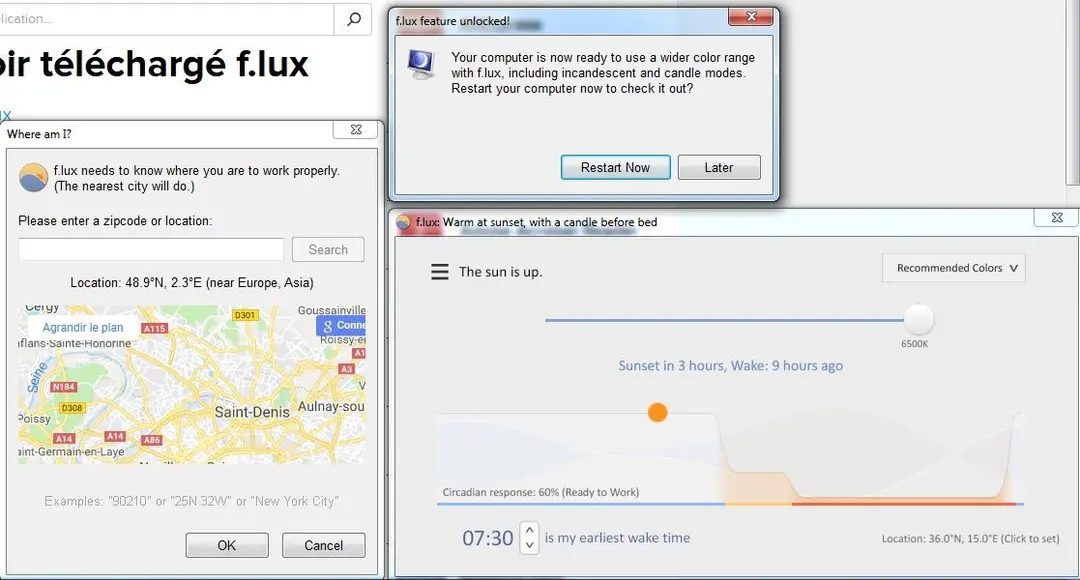
The app needs to know where you are to calculate sunrise and sunset times. It can get this from your operating system’s location services. Or you can type it in manually. Once the initial configuration is done, it works offline. You don’t need an active internet connection to keep the color balance shifting as the day progresses.
This is crucial for security-conscious users. Your location data isn’t being sent to a cloud server for tracking. It’s used locally to adjust the gamma and ICC profiles of your display.
Interface and Language Support
The interface is in English. Documentation is online. If you need help, the community and web guides are there. The setup wizard guides you through the initial steps. It’s not complex. You select your time zone. You set your preferences for day, evening, and night modes.
Exclusions are possible. You can whitelist certain applications if you need accurate color representation for design work or video editing. Shortcuts are available for quick toggles.
Multi-Monitor and Resource Usage
Do you have a multi-monitor setup? f.lux handles it. The support level depends on the operating system, but generally, it applies the color shifts across all connected displays. This ensures a consistent visual experience regardless of which screen you are looking at.
Resource consumption is measured. It doesn’t hog your CPU or RAM. It runs in the background, adjusting pixels as needed. It’s designed to be unobtrusive. You install it and forget it, until you notice your eyes aren’t straining as much at night.
Updating and Maintenance
Updates are handled through an integrated checker or manual download. You aren’t forced into auto-updates that might break your workflow. You control when the software changes. This stability is key for IT administrators managing fleets of machines.
The technical details remain stable over time. The core functionality doesn’t change drastically. This means your setup today will likely work for years to come. No constant re-learning of interfaces. Just consistent, gentle light adjustment.
The Silent Cost of Convenience
The user experience feels polished. Frictionless. You click, you get the thing. But somewhere in the backend, a database is screaming.
Most people don’t think about the how when they update their software. They just want the new feature. The dark mode. The faster load times. What they rarely consider is the architectural debt accumulated in the shadows.
Why Legacy Code Still Rules the World
You might think cloud-native apps have killed old-school programming. You’d be wrong.
Enterprise systems are built on layers of legacy code. COBOL. Fortran. C++. Code that was written when “mobile” meant a brick-sized phone.
Why does this matter to you?
Because that old code is fragile. It wasn’t designed for today’s scale. When a bank or airline updates its interface, it’s often just putting a fresh coat of paint on a crumbling foundation.
The risk? Downtime.
When the foundation cracks, the service stops. And you’re left staring at a loading spinner that never finishes.
The Hidden Trade-off in Feature Updates
Every time you see a “major update,” there’s a trade-off.
Performance vs. Features.
Security vs. Speed.
Compatibility vs. Innovation.
Developers are constantly balancing these competing demands. They can’t do everything perfectly. They have to choose.
Which feature gets dropped? Usually, the ones you don’t notice until they’re gone.
How Security Patches Actually Work
People hate waiting for updates.
They delay them. They ignore them.
But here’s the reality: those patches aren’t just about new colors. They’re about plugging holes.
Hackers are always looking for the path of least resistance. An unpatched system is an open door.
The “why” behind the update notification isn’t corporate greed. It’s survival.
Your data is valuable. Your identity is valuable. The patch closes the lock.
Where the Bottlenecks Really Are
It’s not just code.
It’s infrastructure.
Servers. Bandwidth. Latency.
When you stream a video, thousands of servers are involved. If one link in that chain is weak, the stream buffers.
The user sees the buffer.
The engineer sees the bottleneck.
Location matters. A server in Tokyo can’t help a user in New York instantly. Physics is a hard constraint.
The Future of Software: Invisible and Adaptive
We’re moving toward software that anticipates needs.
Not just reacts.
Predictive algorithms. AI-driven optimizations.
But prediction is tricky. It requires massive data. And massive data requires massive power.
The next wave of updates won’t just add features. They’ll change how the software behaves.
It will be quieter. Smarter.
And probably a bit more invasive.
The Bottom Line: You’re the Product
Think about that.
Every click. Every scroll. Every pause.
It’s all data.
Software companies aren’t just selling you a tool. They’re selling you insights.
The “free” app? It’s not free. You’re paying with attention. And data.
What’s Next for Developers?
They’re getting more tools.
More automation.
But the core problem remains.
Complexity.
As systems grow,