Back in the 2000s, the BlackBerry was the undisputed king of productivity. It demanded your attention. You had to punch through your inbox or blast out BBM messages. It was constant.
Now it is 2026. Unihertz has dropped the Titan 2 Elite. At $490, it feels like a ghost from that era. A modern-day BlackBerry.
And weirdly? The smaller screen keeps me from doomscrolling.
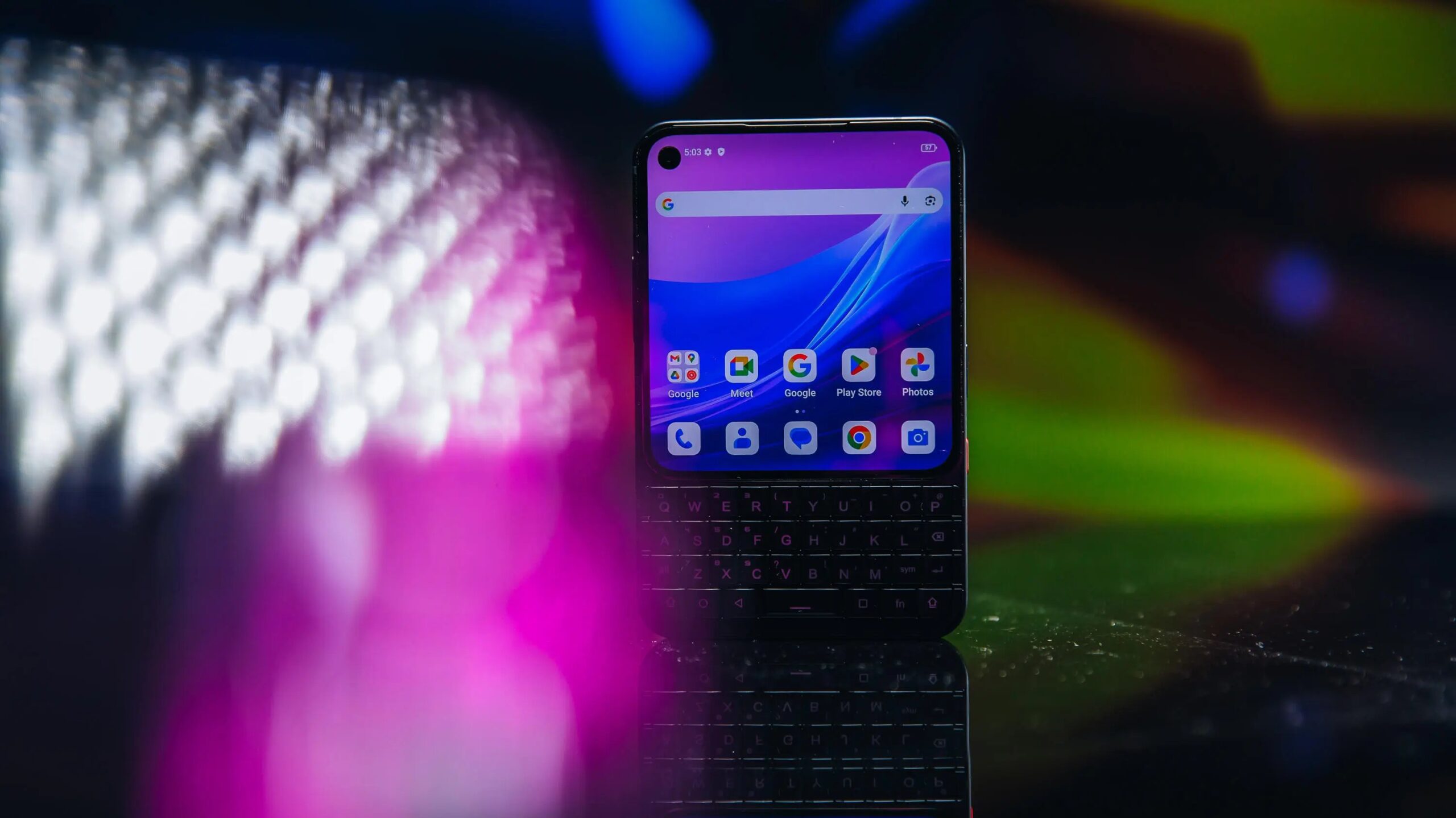
I spent weeks with a prerelease version of this device. Early software included. The design is adorable in a “small phone” sort of way. The 4-inch, square-ish display feels like holding a miniature 4:3 aspect ratio TV. It is compact. That compactness is great for the things I used a BlackBerry for: reading websites, checking email, and typing. Typing a lot.
But watching video? Frustrating. Most apps and websites are built for tall rectangles. A square display fights that.
Unihertz knows this. They are tweaking software. The Titan 2 Elite evokes nostalgia while running modern Android. But if you are comparing it to other keyboard phones, like the upcoming Clicks Communicator, there are details worth calling out.
How the Physical Keyboard Feels
The keyboard is the star. It is good. Not perfect. Just good.
The keys are a nice size. Easy to tap. No mashing multiple letters at once. That is hard. BlackBerry perfected that pattern. Unihertz gets close. There is a ridge on the keys to help you feel the letters. Tap the alt key for numbers.
You do need an adjustment period. Muscle memory is a funny thing. I found myself hunting for symbols. The @ sign? Far right. On the P key. You have to learn that.
If you use asterisks, watch out. It sits right above the alt key. Minor traffic jam.
I type slower here than on my iPhone. It is more precise, though. My iPhone autocorrects me constantly. This phone doesn’t.
Like later BlackBerry models, the keyboard supports gestures. Turn it into a scrolling trackpad by tapping and holding. Double-tap to move the cursor while typing notes. Handy.
Unihertz is still fixing quirks. A software update resolved a issue where I had to double-tap just to start typing in a text box. They have five years of updates. That is impressive. Motorola gives two years. Three years security. Five years is better.
The Display Is a Little TV
The screen is 1080p. 120Hz refresh rate. But that square ratio creates oddities.
Reading websites? Great. Swiping with the keyboard? Smooth.
Video? Hard. The software crops vertical video awkwardly to fit. Maybe that is a perk. Less mindless TikTok watching?
Most apps default to vertical when you hold the phone with the keyboard down. Makes sense for tall phones. YouTube, though? I want full screen. The phone forces “horizontal” mode. That means holding the device sideways.
Now your keyboard is vertical. Like guitar strings.
Instagram is always vertical. Crops top and bottom. Same issue I have on flip phones like the Motorola Razr with the cover screen.
The square shape looks the same either way. The rotation feels unnecessary. Accessibility settings control it. But it needs smoothing out. A proactive button in the overlay would help.
A Decent Camera (For the Price)
Don’t buy this for the camera. But for under $500? It is decent.
Not Google’s $499 Pixel 100A level. But I like the detail. The 50-megapixel wide-angle lens is sharp. The 50-megapixel telephoto is a treat. You rarely get a standalone telephoto on phones under $650 anymore.
I shot this on a sunny morning in Queens.
Wide-angle shot: Lots of detail in the street scene and people at the cafe. Shadows skew black though. Dynamic range is limited.
Then the 2x optical zoom. Better exposure. Softer details. The “33 St” sign loses texture. Trees look less defined.
Indoors? Muddier. Took a photo of a Megazord Power Rangers display at the Sweet Suite event. Text on packaging looks soft. Dim lighting. Small sensor inside the phone.
Selfies?
Outdoor sunset selfie on a rooftop? Detailed. Sun helped.
CNET office selfie? Foggy. Artificial overhead lighting killed it.
This is typical for $300–$400 phones. The keyboard is why you buy it. It isn’t a premium camera device. So I give the camera shortcomings a pass.
The Competition Is Coming
Good year for BlackBerry fans.
My test model had 256GB storage. MediaTek Dimensity 7400.
There is a Pro model. $580. 512GB storage. Dimensity 8400. Both are on preorder now.
Shipping in September, the Titan 2 Elite might arrive before the $500 Clicks Communicator. Or close enough. Both bring back clicky keyboards.
Unihertz goes for that 2000s BlackBerry vibe. Clicks? Modern take on a RIM device. Designed by a former BlackBerry designer. Clicks is from the company making keyboard cases for iPhones. Inspired by the Clicks case for the Motorola Razr. Runs Android 16 with the Niagara launcher.
The Communicator has the Dimensity 8300. 256GB. microSD up to 2TB. Notification LED around a dedicated “Prompt” key. Headphone jack. Swappable backplates. Qi2 charging.
We have to wait to compare them side by side. Both offer longer software support than usual for this price. That is commitment. Apps are optimized for rectangular slabs now. BlackBerry left the building years ago.
But if these phones find an audience, maybe the kinks get worked out. So fans can type again.
Until then, I’m here. Squinting at my square screen. Typing emails. Ignoring the world.