The internet holds more information than any single human brain can process. Even an army couldn’t sort through the daily flood of news reports to find what matters. And another army would be needed to decide which bits the average user actually wants. Digg.com attempted to solve this by turning that work over to the crowd. It became a user-driven news site where hundreds of thousands of people handled the finding, submitting, reviewing, and featuring of stories from across the web.
Think of it as Slashdot minus the editors. Digg took a democratic approach. Users made every content decision. Kevin Rose, who previously worked on-air for TechTV, co-founded the platform in December 2004. He partnered with Jay Adelson, the former CEO, and Owen Byrne. Rose spent just $1,000 to launch Digg, relying heavily on open-source software. The growth was rapid. Six months later, the site had roughly 25,000 registered users. A year in, that number jumped to 80,000, with 500,000 unique visitors daily. By March 2007, Digg crossed the one-million registered user mark. Estimates by 2008 placed the unique account count above 2.7 million.
How Digg’s community structure actually works
The community functioned through distinct, often overlapping roles. Submitters posted links from blogs, professional news sites, and random web corners into the Digg queue. Casual reviewers scanned this queue and clicked a “Digg it” button if they found the story interesting. Once an article accumulated enough Diggs, along with meeting certain secret requirements, it was promoted to the homepage.
Then there were the dedicated reviewers. These users spent hours daily combing through the queue, actively promoting good stories and reporting bad ones. Enough reports would cause a story to be removed. This group effectively drove what appeared on the homepage, causing massive traffic spikes. These surges often crashed unsuspecting web servers. Small sites or home servers could be crippled when traffic jumped from 400 visitors a day to 5,000 in two hours. Even major sites like HowStuffWorks could detect the impact. When stats showed thousands of extra clicks per hour to a single article, staff checked other news aggregators like Slashdot, Fark, Yahoo! Buzz, and Digg to see who was driving the traffic.
Finally, there were the readers. They made up the majority of the user base. They consumed the curated stories and generated the ad revenue that kept the site alive. In return, they gave submitters and reviewers a purpose.
Why the Digg interface felt revolutionary but remained simple
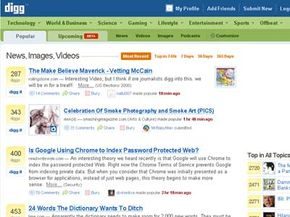
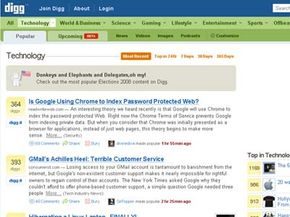
Some called the premise revolutionary. The actual functions, however, were pretty straightforward and intuitive. Getting started was easy. When you loaded the Digg.com homepage, you saw the moment’s most popular stories. These items had already been Digg’d by enough users to warrant front-page placement. The layout prioritized immediate access to trending content, removing the friction of searching for news.

Setting up your Digg account
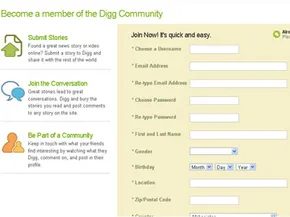
Registration is fast. You’ll be in and out in seconds. Why bother? Because you can’t do much without it.
Once you create a login, the site unlocks. You can start submitting stories. You can dig for others. You become part of the conversation, not just a spectator scrolling through the homepage.
Think of it like getting a library card. You can walk in and browse, but you can’t check anything out until you’re on the list. Same logic applies here. Your account is your entry ticket to active participation on Digg.

How the Digg queue works and what “burying” actually does
The Popular tab displays stories that have racked up the most Diggs. You dig into the “Upcoming Stories” queue, find a headline you like, and click the “Digg” button to the left of the title. Every story you Digg gets saved to your account. It creates a running log of everything you’ve ever endorsed. That’s useful for later.
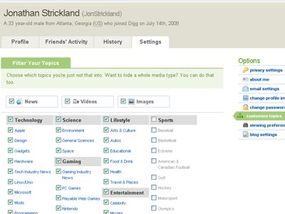
The more Diggs a story accumulates, the higher its chance of hitting the homepage. You can also filter the queue by category. Digg offers tabs for news stories, videos, images, and podcasts. If you care about tech but don’t give a fig about motorsports, just uncheck that box. Digg filters the feed so you only see what you actually want.
How to join the conversation on a Digg story
Found a story that sparked an argument or a thought? Click the “comments” link under the story description. Scroll to the bottom. Add your voice to the mix. It’s the standard way to discuss content with other users on the platform.
Why stories get buried and what happens to them
Digg relies on users to report problems. Duplicate stories, dead links, incorrect facts, stale content, lame takes, and spam all have a place in the “problem” drop-down list beneath each story description. Click the relevant link to report it.
When a story gathers enough reports, or “buries,” it vanishes from the active queue. It doesn’t get deleted entirely, though. It just moves to search results and user profiles. It’s a soft deletion that keeps the main feed clean.
How to submit your own story to the Digg queue
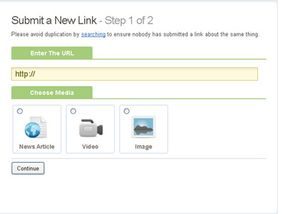
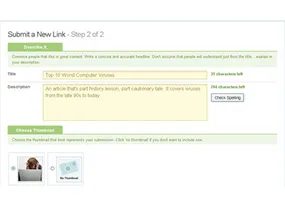
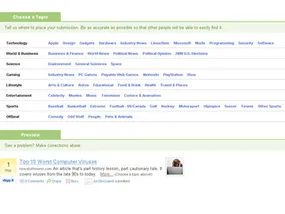
You can post stories yourself. It’s surprisingly fun to watch your submission try to climb the ranks. Click “Submit a Story” in the upper right-hand corner of the homepage. Do a keyword or URL search first. If your story hasn’t been submitted yet, you’ll need a title, a link, and a short description.
Once submitted, the story lands immediately in the Upcoming Stories queue. It’s visible to everyone. The rest is up to the crowd. It either gathers enough Diggs to hit the homepage or it fades into obscurity. It might also get buried if users report it.
What happens after submission
The outcome is binary. Your story makes it, or it doesn’t. If it fails to gain traction or gets reported by multiple users, it disappears from the main view. The next section covers the special features built into Digg that go beyond basic browsing and submitting.

Tracking Digg activity and discovering new content
Digg is not just a link aggregator. It functions as a social bookmarking hub and a blog feeder all at once. You can dig deeper than the front page.
Digg Recommendations works through a specific algorithm. It scans other members who have “Dugg” the same stories you have. This helps you find kindred spirits or catch stories you might have missed. You can browse this through the “Upcoming” tab or switch to the “All” view.
Digg Spy gives you a real-time window into site activity. Watch stories get submitted, promoted, Dugg, or reported as they happen.
Other utilities include:
- Social bookmarks: Add friends and monitor their Digg activity via your profile.
- Podcast: Subscribe to Diggnation to hear founder Kevin Rose and his co-host discuss top weekly stories and platform issues.
- Blog connections: One-click blogging is available if you host on Typepad, Blogger, Live Journal, Moveable Type, or Wordpress. Just click “blog story” under any description. You can also add a “Digg this” button to your own posts. It is not an official Digg feature, but the company does not seem to mind.
- RSS feed: Integrate Digg into your site. Options include all homepage stories, stories you Digg or comment on, and stories from your friends.
- E-mail story: Share links directly via the “email this” link.
- Block/report user: Hide unwanted users from your view. If enough users block a specific person, that user may get banned.
Digg Labs and experimental applications
Developers at Digg are constantly building new tools. Digg Labs hosts these experimental apps. Some track image usage across the platform. Others change how stories display.
Take BigSpy. It displays stories with varying font sizes. Larger fonts mean more Diggs. It is a visual representation of popularity.
The business model behind Digg
The user side feels voluntary. A consistent, curated homepage is produced by the crowd. That is a brilliant business strategy. Paying employees to do the same work would be expensive.
Under the surface, the operation is substantial. Digg employs 75 people. They plan to double that number by the end of 2009. The infrastructure runs on hundreds of servers.
Diggnation: The official voice
Digg has an official blog written by Kevin Rose. Then there is the Diggnation podcast. Rose hosts it with former TechTV co-host Alex Albrecht. They cover the most popular submissions of the week. They also address Digg-related news you will not find elsewhere. Check out Rev3: diggnation to subscribe.
Digg Technology

The Server Room: LAMP Stacks and Server Counts
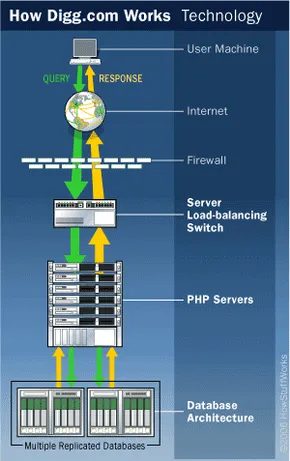
Digg’s tech stack looked almost quaint for a site pulling in 230 million page views a month back in May 2008. No exotic middleware. No complex microservices yet. Just LAMP : Linux, Apache, MySQL, and PHP. It was a tight coupling of server applications and database management that allowed multiple languages to talk to each other without much friction.
How many servers did it actually take to keep that machine running? Kevin Rose guessed around 75 back in a 2006 Diggnation podcast. By 2008, the Digg technical blog offered a more vague answer: the company ran 1.8 to 2.5 times the minimum servers required. In practice? No one inside the company really knew the exact number.
Jay Adelson, who ran the show as CEO, broke down the hardware for HowStuffWorks. The racks held Penguin Computing and Sun servers. The web layer ran on Debian Linux with PHP doing the heavy lifting. The data layer sat on MySQL. Adelson noted that Digg didn’t need to store massive amounts of data because the content was almost exclusively text. He called the setup “infinitely scalable.”
In December 2005, Adelson told Mad Penguin that Digg was doubling its infrastructure every single month. Demand was eating resources faster than they could be deployed. The architecture relied on server-side storage. No cookies. Your history, friends, comments, and past diggs lived in your profile inside the Digg database. You had to log in. That login acted as a first-line security check, verifying user validity for every visit.
How Digg Used Karma Checks to Fight Spam
Digg didn’t rely on human editors to flag bad actors. It used code. Specifically, a system Adelson called “karma checks.” These checks ran at critical junctures in the user journey.
When you submitted an article, the system immediately verified legitimacy. Was it spam? Was it auto-submitted by a bot? Was the account banned or limited? Adelson explained that the karma system looked at a bunch of factors, including what he called “unique properties to digg’s critical mass of users.”
The second checkpoint happened when a story was up for promotion. If a post had enough diggs, and enough velocity, it moved toward the front page. But the system paused. It checked if those diggs were real. It looked for fraudulent accounts created solely to boost a story.
“Our karma system knows the difference between users created to just digg a story and a user who has interacted with the site.”
It also hunted for auto-digging. If a computer was clicking digs in rapid succession to force a story onto the homepage, the algorithm caught it.
No Editors, No Censorship: Just Algorithms
Did anyone at Digg manually bury stories? No. Adelson confirmed there was zero editorial control behind the scenes. No censorship. Not at submission. Not at promotion. Not at burial.
If you didn’t like cursing, you could turn on a profanity filter. That was the extent of content moderation. When a story got buried, it wasn’t because a person decided it was bad. It was because a proprietary de-promotion algorithm determined the story was ready to disappear from the main pages. It ran the same way everything else did: mathematically.
The Money Behind the Machine
All that democratic, algorithmic energy didn’t come cheap. In September 2008, Digg raised $28.7 million in venture capital. That single round more than doubled the total amount Kevin Rose had raised since founding the company in 2004. The money validated the model, at least for the investors. But it also highlighted a tension that was about to boil over.
User Backlash: The 2006 Hubub
The system felt democratic. It felt forward-thinking. It turned regular users into editors, reporters, and gatekeepers. But that purity started to crack in mid-2006. A select, vocal group of users began to question whether Digg’s user-driven nature was actually working. The hubbub was loud. It challenged the idea that an algorithm could truly represent the “will” of the community.
The next section digs into how users reacted to those early cracks.
When the Front Page Becomes a Stock Market Tool
Remember that “99% fantastic” quote from ForeverGeek’s Macgyver in 2006? Most users still agree with it. The original Digg vibe was electric. Users raced to break news. Hidden gems surfaced, often revealing obscure bloggers doing heavy lifting. The crowd seemed genuinely invested in promoting good work and burying the bad. In theory, that decentralized power made the site hard for corporations or over-zealous editors to corrupt.
Except it wasn’t hard. Not entirely.
The complaints started small. Article comments were often rude, silly, or just plain empty. As the site grew, so did the anxiety about abuse. Spamming, fake accounts, and auto-digging became constant headaches. But there was a darker vector: the marketing potential of a site with zero editorial gatekeeping. Unscrupulous site owners could post irresistible-sounding stories, not to inform, but to drive clicks. Generate page views. Boost ad revenue. The users were the funnel.
Then came March 2006.
The Google-Sun Rumor Incident
It looked like a standard breaking news cycle. A rumor surfaced: Google was buying Sun Microsystems. The stock price would skyrocket if true. Submissions hit Digg in rapid succession. At least four in a single day. Several hit the front page.
But the Diggers promoting them? The same people.
There was no truth to the rumor. No deal. No acquisition. Yet the pattern suggested a coordinated effort. Some wondered if those posters were using Digg to spread a false rumor, hoping to pump Sun’s stock price and make a quick profit. It was a strange abuse vector. Not just spam. Not just auto-digging. Market manipulation via social media signal.
Why the “99%” Still Held (Mostly)
The 1% failure rate made sense. Digg was handling over a million visitors and 1,500 submissions a day. You can’t catch every piece of spam, every fake account, every auto-dig script. The sheer volume guaranteed leaks.
But Macgyver’s real complaint wasn’t about the spam. It wasn’t about the fake stock rumors. His issue was deeper. It was about the absence of editorial control. That “mini-battle” reported on tech blogs everywhere wasn’t about moderation failures. It was about philosophical friction over who gets to decide what’s news.
If you’re looking for alternatives to Digg’s model, the landscape in 2006 included:
- del.icio.us
- FARK.com
- linkfilter.net
- reddit.com
- Slashdot.org
- Yahoo! Buzz
Each had its own quirks, its own user base, its own take on curation. Digg stood out for its raw, unfiltered energy. That was the appeal. And that was the problem.
The controversy wasn’t going to resolve itself neatly. The next section dives into exactly how that played out.

How a Digg user spotted a potential auto-Digging anomaly
It started small and quiet. Macgyver, a frequent submitter to ForeverGeek and Digg, noticed something strange. Two stories submitted by the same user appeared on Digg. They had nearly identical Diggers in nearly identical Digging order. Both made it to the front page. One Digger for each story was Kevin Rose.
Macgyver didn’t draw a conclusion. He just posted the observation on the ForeverGeek blog. The obvious inference was that Digg missed an instance of auto-Digging. The presence of Kevin Rose as a Digger added another layer of oddness. He left that part unexplained.
Why Digg banned the ForeverGeek URL after the report
A ForeverGeek reader, not Macgyver, submitted the blog story to Digg. The reaction was swift. The story became un-Diggable, effectively buried. Digg banned the ForeverGeek URL entirely. Users could no longer submit stories from that domain. The buried story vanished from the site soon after.
That sequence raised questions about how Digg handled meta-reports on its own moderation failures. The ban wasn’t just about the specific story. It was a domain-level block. ForeverGeek submissions were shut down. The incident highlighted how quickly the platform could suppress coverage of its internal glitches.
The Fallout: Why the Digg “Corruption” Scandal Never Fully Resolved
Macgyver wasn’t the only one digging through the mud. He followed up with a blog post titled “Digg Corrupted: Editor’s Playground, not User-Driven Website,” and the story spread like wildfire. Kevin Rose, then a key figure at Digg, posted a response on the official Digg blog. His take? Nothing funny was happening. He claimed he simply Diggs stories he finds interesting. If auto-Digging was occurring in that specific instance, he said he had no idea.
Rose also addressed the ban on ForeverGeek. It wasn’t arbitrary, he insisted. The site was breaking Digg policies against spamming and fraudulent accounts.
But Macgyver didn’t let it go. He called Rose’s reply a “(non)response” and kept questioning the very premise of the website: its lack of editorial control. He documented the entire event in a running account on ForeverGeek. Then, without explanation, ForeverGeek was unbanned from Digg.com. Free to submit at will again. The mystery remained.
How Digg Evolved After the Controversy
This little unresolved episode aside, Digg seems to be doing just fine in terms of traffic and funding. It has plans. The latest version of Digg includes new categories encompassing all types of news, not just science and technology.
There’s also a “Top Digg Users” feature. This lets you check out the activities of the most active (and therefore influential) people using the Digg Web site. This type of tracking makes it easy to discover people you’d like to add to your friends list so you can keep up with their Digging activities.
Where to Learn More About Digg and Its Ecosystem
For more information on Digg.com and related topics, check out the links below.
Related HowStuffWorks Articles
- How Blogs Work
- How MySpace Works
- How Podcasts Work
- How Spam Works
- How Web Servers Work
More Great Links
- del.icio.us
- Digg.com
- Digg Tools
- Fark.com
- Yahoo! Buzz
Sources
- Alex Bosworth’s Weblog. “Dynamics of Digg.” Dec. 23, 2005. http://www.sourcelabs.com/blogs/ajb/2005/12/dynamics_of_digg_1.html
- Andrews, Robert. “Digg Just Might Bury Slashdot.” WiredNews. Nov. 17, 2005. http://www.wired.com/news/technology/1,69568-0.html
- Digg.com. “About Digg: Frequently Asked Questions.” http://digg.com/faq
- Digg Blog. http://diggtheblog.blogspot.com/
- Diggnation. Revision3. http://revision3.com/diggnation
- Einfeldt, Christian. “Digging Distributed Journalism: Digg.com.” Mad Penguin. December 16, 2005. http://madpenguin.org/cms/?m=show&id=5796
- E-mail interview with Jay Adelson, CEO of Digg.com. June 14, 2006.
- Fioca, Brian. “Digg PHP’s Scalability and Performance.” O’Reilly Media, Inc. April 10, 2006. http://www.oreillynet.com/onlamp/blog/2006/04/digg_phps_scalability_and_perf.html
- Gannes, Liz. “Kevin Rose Becomes CEO in Shake-up at Digg.” GigaOm. April 5, 2010. http://gigaom.com/2010/04/05/kevin-rose-becomes-ceo-in-shake-up-at-digg/
- Graham-Cumming, John. “How many users does Digg have?” JGC.org. Jan. 29, 2008. http://www.jgc.org/blog/2008/01/how-many-users-does-digg-have.html
- Kopytoff, Verne. “Populist news sites give readers what they want.” SFGate.com. April 17, 2006. http://www.sfgate.com/cgi-bin/article.cgi?f=/c/a/2006/04/17/BUG78I9FMQ1.DTL&hw=digg&sn=001&sc=0001
- Liedtke, Michael. “Internet startup Digg gets infusion of $28.7 million.” Rocky Mountain News. Sept. 29, 2008. http://www.rockymountainnews.com/news/2008/sep/29/internet-startup-digg-gets-infusion-of-287/
- Macgyver. “Digg Corrupted: Editor’s Playground, not User-Driven Website.” ForeverGeek.com. April 20, 2006. http://forevergeek.com/news/digg_corrupted_editors_playground_not_userdriven_website.php
- Perez, Sarah. “Digg Townhall #2 Wrap-Up.” ReadWriteWeb. May 13, 2008. http://www.readwriteweb.com/archives/digg_townhall_2_wrapup.php
- Silicon Valley Sleuth. “Could Digg be used for Sun stock manipulation?” Mar. 17, 2006. http://www.siliconvalleysleuth.com/2006/03/digg_is_used_fo.html
- Splasho. “Suspicious Digging.” Splasho.com. April 20, 2006. http://splasho.com/blog/2006/04/20/suspicious-digging/
- Stone, Brad and Steven Levy. “Who’s Building the Next Web?” Newsweek.com. April 3, 2006. http://www.msnbc.msn.com/id/12011437/site/newsweek/