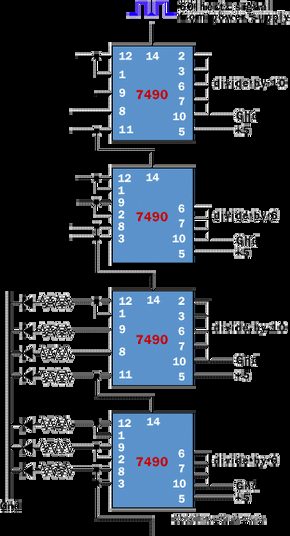
The previous circuit can easily be extended to create a “second hand” for a digital clock. The logic is simple once you understand how the chip interacts with the timing signals.
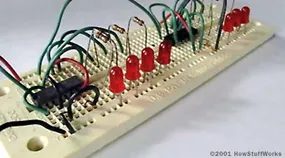
Two 7490 chips up top handle the heavy lifting. They take the 60-Hz signal from the power supply and divide it down by a factor of 60. This creates a base rhythm for seconds. The third 7490 takes a 1Hz signal as input and divides it by 10. Its four outputs drive the normal LEDs of this diagram. The fourth 7490 divides the output of the third by 6, and its three outputs also drive regular LEDs. At this point we get the “second hand” of the clock, and the result of the second hand is in binary. If you want to create a clock that displays the time in binary numbers, you’re all set. Here is a view of a breadboard that includes a divide-by-10 counter, a divide-by-6 counter, and a set of LEDs that display the counter’s output in binary.
Tying the Knots
Push the wires down. Tuck the extra length behind the component legs. If you rush this, you’ll end up with a rat’s nest that will make debugging a nightmare. But if you respect the grid, the breadboard becomes manageable.
This dense packing is not only aesthetic. It’s practical. Four separate counters fit on one board.
Most people stop at two. They leave gaps. They waste space. But if you are disciplined about routing and keep the cabling clean, the math works out. Four counters. One board.
It changes the workflow.
You don’t need multiple prototypes. You don’t need to swap chips between boards to compare performance. You can run parallel tests. You can see the interaction between the stages without lifting a probe.
Physical limitations force better design habits. You need to think about signal paths before making connections. You can’t just dangle wires everywhere. Every inch of the board is important.
A short circuit is easier to detect when the wires are straight. It’s easier to trace a fault when the layout isn’t chaotic.
So pack it tight. Keep it neat.