An operating system is the bedrock of computing. It sits between your physical hardware and the software you use daily. Whether you are on Windows, Linux, or macOS, the OS manages memory, processes, and device drivers. It is the essential layer that makes a computer function at all.
This strict definition is why many purists cringe at the term Web operating system.
A true OS talks directly to the silicon. A Web OS does not. It is a user interface (UI ) that runs inside a browser. It presents a desktop metaphor—icons, windows, taskbars—but it has no direct access to your hard drive or CPU in the way traditional software does. You still need a real OS to host the browser. The Web OS is just a sophisticated skin.
Despite the semantic pushback, the concept has taken off. Dozens of these platforms exist today. Some are polished products from large teams. Others are hobbyist projects from a single developer. Prices range from free to premium. Functionality varies wildly.
Why the confusion? Terminology is messy. Some people write it as one word: WebOS. That causes issues. UC Berkeley launched a project called WebOS in 1996. It focused on wide-area applications. It is not related to the browser-based desktop concept. To avoid this clash, some prefer terms like Web Desktop or Webtop. These terms acknowledge that the experience mimics a traditional desktop without claiming the underlying system architecture of a real operating system.
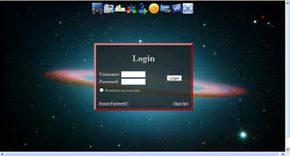
So what happens when you log into one of these systems?
The Illusion of Local Control
The core appeal of a Web operating system is simplicity and accessibility. You do not install heavy applications. You do not manage patches or drivers. You open a browser, log in, and you are working.
The interface looks familiar. This is intentional. The goal is to lower the barrier to entry. Users expect a start menu, a taskbar, and clickable icons. Web OS platforms provide exactly that. They replicate the muscle memory of using Windows or Mac OS.
Behind the scenes, the heavy lifting happens on remote servers. Your files are stored in the cloud. Your applications run in a virtualized environment. Your browser is just the window. This architecture allows you to switch devices without losing your place. A tablet, a laptop, or a public kiosk can all show the same desktop. The state is preserved on the server, not the local machine.
This matters for mobility. It matters for security. It matters for anyone tired of managing software compatibility.
But there is a catch. Latency.
If your internet connection flickers, your desktop freezes. The responsiveness you expect from a local OS depends entirely on your bandwidth and the server load. A true OS feels instant because the hardware is right there. A Web OS feels instant only when the network is reliable.
Which Web OS Should You Use?
The market is fragmented. There is no single dominant player like there was with Windows in the 1990s. This creates a confusing landscape for new users. How do you choose?
Look for stability first. Some platforms are still in beta. They may lose data or change their interface overnight. Established projects tend to have better documentation and more consistent performance.
Check the feature set. Do you need office suites? Collaboration tools? Specific developer environments? Some Web OS platforms offer integrated suites. Others are just bare-bones interfaces that require you to link to third-party web apps. The latter is more flexible but less cohesive.
Consider the


Web operating systems aren’t standalone platforms that replace Windows or macOS. Instead, they are interfaces that connect you to distributed computing systems. Think of it as a bridge. You, the user, connect via the Internet to a provider’s network of application servers and databases.
Access happens in two ways. Some systems run entirely in your Web browser. Others require you to download a specific client program tailored to your device. The result is the same: you are running software stored on the Web, not on your local hard drive.
What Services Do They Actually Offer?
The promise is simple. You get access to almost any desktop application. The list is long:
- Calendars
- E-mail clients
- File management tools
- Games
- Instant messaging
- Photo, video, and audio editors
- RSS readers
- Spreadsheet and word processing suites
In a traditional setup, you install these apps. They sit on your CPU’s hard drive. Your computer’s native OS handles the requests. A Web OS changes the architecture. The apps live on Web servers. When you save a file, it goes to an Internet-connected database. You can save locally, but the default behavior is cloud storage.
This decoupling is the key feature. Because the software isn’t tied to your hardware, you can start a document on one machine and open it on another. Accessibility is the main benefit. Your data isn’t locked to a single device.
Portals vs. Web Operating Systems
It’s easy to confuse a Web OS with a portal. They look similar but function differently.
A portal, like the now-defunct iGoogle, is a customizable homepage. It aggregates news feeds, e-mail, and widgets. It gives you access to multiple data sources from one page. But it doesn’t try to mimic a desktop environment.
A Web OS tries to emulate a desktop. It has windows, taskbars, and application icons. It manages a user experience that feels like a local computer, even though the processing happens remotely. Portals don’t do this. They are gateways. Web OS platforms are environments.
The Technology Behind the Interface
Developers use different techniques to build these experiences. There is no single standard. The two dominant approaches rely on Flash or AJAX technologies.
Flash-Based Systems
Flash uses vector graphics. Instead of storing individual pixels, it records shapes and lines. This allows for faster loading times and smaller file sizes. Flash files stream over the Internet. You don’t wait for the entire download. A classic example is a video player. You can start watching before the file is fully saved.
Flash was a favorite for Web OS developers because of its reach. At its peak, over 98 percent of Internet-connected computers had a Flash player installed. Developers could build a complex interface knowing most users could run it without extra downloads.
AJAX-Based Systems
AJAX stands for Asynchronous JavaScript and XML. It’s a browser-based approach that relies on four main technologies:
- HTML : The markup tags that structure the page.
- CSS : Cascading Style Sheets that control appearance (fonts, colors, layout).
- JavaScript : The programming language that allows the browser to send and receive data from servers without reloading the page.
- XML : A markup language that describes the structure of the data.
This stack allows for dynamic updates. When you click a button in an AJAX-based Web OS, the page doesn’t refresh entirely. JavaScript talks to the server in the background, updates the relevant section, and displays the new info. It feels snappier. It feels more like a native app.
Both methods aim for the same result: a desktop-like experience delivered over the Web. The choice between them often comes down to performance, compatibility, and how much control the developer wants over the interface.
Think about the last time you clicked a link and watched that spinning wheel. You waited. The page froze. The world stopped. That is the old way. It is the way of the full page reload.
AJAX changes the rhythm.
The word “asynchronous” is just tech-speak for “not all at once.” Instead of demanding a brand new HTML page every time you want to see a change, the browser asks for just the data it needs. A few bytes here. A text string there. The server sends back the missing pieces in small, digestible bites. The rest of the screen stays put. It feels instant. It feels native.
This isn’t magic. It is efficiency.
When you send an entire Web page to the browser every time something changes, you are wasting bandwidth. You are slowing down the user’s experience significantly. AJAX applications transfer data between servers and browsers in small bits of information as needed. The result? Speed. Smoothness.
Desktop Power in the Browser
The goal was always to blur the line between a Web app and a desktop program. With sufficient skill and knowledge, a programmer can create an AJAX application with the same functions as a desktop application. You get drag-and-drop. You get real-time updates. You get interfaces that respond to a click before you’ve even lifted your finger.
But here is the catch that keeps IT managers awake at night: compatibility.
Unlike Flash, which often required specific plugins or specific browser versions to run properly, AJAX relies on established Web standards. It isn’t a new programming language. It is a way to use the tools already present in your browser to create new applications.
Most computers can run AJAX applications because the browser does the heavy lifting. As long as an application programmer includes the right information in an application’s code, it should run fine on any major Web browser. Chrome. Firefox. Safari. Edge. The code adapts.
Look at Gmail. Look at Google Calendar. These are not static pages. They are dynamic engines built on this architecture. They update your inbox without a reload. They save a draft while you type. They work because the browser handles the asynchronous communication behind the scenes.
Why Would Anyone Want to Use a Web OS?
We have moved past the simple “Web 1.0” days of reading text. We are building entire ecosystems inside the browser tab. But why take the risk? Why run an operating system on the Web instead of your hard drive?
The answer lies in accessibility and maintenance. If the OS lives in the cloud, you never have to patch the core system. You never have to worry if your laptop is too old to run the latest version of Windows or macOS. If it has a browser, it has a computer.
But before we dive deeper into the architecture of Web Operating Systems, consider the trade-off. You are trusting a remote server with your local files. You are exchanging total control for convenience. Is that a fair trade?
The Fragility of Connection
The beauty of AJAX is its invisibility. You don’t see the data moving. You just see the result. But that data movement requires a lifeline. The internet connection.
This brings us to the next hurdle. If the network drops, does the application die? Or does it adapt? That is the question that defines the next generation of Web

The Shift to Remote Workstations
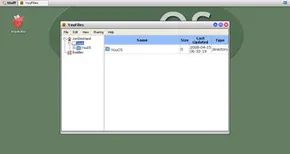
Running apps from a remote server is supposed to feel exactly like using a desktop. The goal is familiarity. If the interface mimics the OS you already know, adoption is instant. When you click an icon, your machine sends a request to a control node. This central server acts as the traffic cop. It routes your connection to the specific application server or database where the tool lives. You are essentially offloading storage and processing power to a remote network.
This is the main selling point for many. You stop worrying about hardware upgrades every few years. As long as your current device can run a browser or client software, you are good to go. No need to buy a new PC just to run the latest version of your productivity suite. The burden of functionality shifts to the provider. If they fail to deliver, you leave.
Cross-Platform Data Syncing
Sharing data between disparate devices is another major advantage. Say you have a Mac and a PC. Keeping files in sync is usually a pain. Even with compatible formats, you end up with duplicate copies. Edit one? The other stays stale. A web operating system creates a single, remote copy of the file. You use any computer to access, modify, and save to that one source. It only works if the web OS is cross-platform. But if it supports both Macs and PCs, you can work on the same file from either machine.
Collaboration gets simpler too. Most web OS platforms let users share files directly. Everyone works from the version saved on the system’s native network. This beats the old method of emailing multiple versions and merging changes manually. It’s cleaner. It’s faster.
The Trust Gap and Security Risks
Web operating systems aren’t as robust as desktop counterparts yet. But they offer enough functionality to compete with traditional suites. If providers can close the feature gap and solve data security concerns, we might see a massive shift in network infrastructure.
The biggest hurdle is trust. Users must hand over sensitive data to a third party. That’s a leap of faith. Can the provider fend off hackers? It’s in their best interest to use advanced security. As distributed computing grows, the battle between hackers and security specialists will intensify.
Common Questions
What are the top five operating systems?
The industry generally focuses on five main players: Apple macOS, Microsoft Windows, Google’s Android OS, the Linux Operating System, and Apple iOS.
Are there complete online operating systems?
Many exist, but most are incomplete. They offer basic functions like a web browser. They aren’t designed to replace a full operating system.
The Ghost in the Machine: Why WebOS Never Was
The archives from 2007 and 2008 are dusty, but they hold the blueprint for the cloud era we now take for granted. Back then, the industry was obsessed with a specific, somewhat delusional concept: the Web Operating System. It wasn’t just a buzzword; it was a genuine structural attempt to move the desktop into the browser.
Emre Sokullu’s review of GravityZoo captures the essence of this weird, wonderful moment. He called it a “WebOS Jim, but not as we know it.” That phrasing matters. It suggests a mimicry. GravityZoo didn’t just look like Windows; it tried to be Windows, but in HTTP. It was an operating system that lived on a remote server, streaming a desktop experience to your client. It felt familiar because it needed to. Users didn’t want to learn a new metaphor. They wanted the Start menu. They wanted the taskbar. They wanted the illusion of local storage, even if the files were just bits floating in a data center somewhere.
Then there is YouOS, which approached the problem from the opposite direction. Their manifesto wasn’t about mimicking the desktop; it was about redefining the interface entirely. They asked a simple question that still haunts designers today: if the browser is the new computer, why does the user interface need to look like a windowed OS at all?
Jeremy Zawodny’s critique, “There is no Web Operating System,” cut through the hype with surgical precision. He argued that the term itself was a category error. A browser isn’t an OS. It’s a container. You can’t build an OS on top of a web app because the web app is the application layer. To call it an OS was to misunderstand the architecture. But here is the kicker: Zawodny was technically right, and practically wrong.
Why the Definition Failed
The confusion stemmed from a fundamental misunderstanding of what an operating system does. Traditionally, an OS manages hardware. It talks to the disk drive, the RAM, the GPU. A web browser manages tabs. It talks to the network, the DOM, the JavaScript engine.
When GravityZoo or YouOS claimed to be an OS, they were offering a virtualized desktop environment. This is a critical distinction. They weren’t replacing Windows or Mac OS. They were providing a layer of abstraction that sat between the user and the local OS.
Think of it like this:
- Traditional OS : Direct hardware access. High performance. Local latency.
- WebOS (2007 concept) : Indirect hardware access via browser. Lower performance. Network latency.
The “WebOS” label stuck because it was catchy. It promised a future where your computer was just a thin client. Where your identity was your URL. Where you could log into any machine, any country, any café, and find your entire digital life waiting for you.
The Legacy of the Failed Concept
So why did it fail? And why does it matter now?
It failed because the technology couldn’t keep up with the promise. In 2007, streaming a desktop interface over a dial-up or early broadband connection was a nightmare. Latency killed the experience. JavaScript