Modifier PDF is aimed at a very specific niche: users who need to make changes to PDF files but don’t want the bloat of an enterprise-level package. It is designed for both professionals and individual users who need to edit text, correct typos and add images without technical barriers. The user interface design is intuitive. You don’t need a computer science degree to use it. Download, install and start working.
This software stands out for its balance of simplicity and functionality. You can add or remove pages. Highlight paragraphs. Add a signature field. Fill out the form and export your files to formats compatible with other platforms. Security is also a key feature. Password protect your documents and manage permissions to lock down sensitive information.
Performance matters. This software can handle large files smoothly. Converting and merging operations are fast. The original layout and graphic quality are preserved. This is very important for anyone creating professional documents. Supports various PDF standards and integrates multimedia elements such as images and interactive links. This makes it a versatile tool for daily tasks.
Advanced customization options allow you to adjust document properties and add watermarks for protection and identification. It is built specifically for Windows and integrates well with your office ecosystem. Easily share and collaborate within your team. The overall experience prioritizes efficiency and accessibility. This is essential in administrative, educational or creative work.
System requirements and installation process
Modifier PDF is strictly a Windows application. It is listed in the Office category of the Futura Software Library. Supports multiple operating systems. From the old Windows XP (which still exists in some traditional enterprise environments) to the latest Windows 11. This wide compatibility means you don’t need a new computer to use it effectively.
Installation is very easy. You can download installers from trusted sources such as Futura. The installation wizard guides you through the entire process. Accept the terms, select the installation directory and, if necessary, select additional components. There are no complicated technical requirements. This process only takes a few minutes. The software is immediately ready for use.
Mac and Linux users are out of luck. Unlike some competitors, Modifier PDF does not have a native version for macOS or Linux. Apple and Linux users must use Windows with virtualization software or switch to alternative solutions. There is also no mobile support. There is no separate app for Android or iOS. If you need to edit on the go, you’ll need to convert the file, edit it on your Windows PC, and then transfer it to your phone.
The developers also take into account the old requirements. Futura libraries usually preserve previous versions if you have hardware limitations or want to use older versions. This allows users to download a specific version that best suits their system limitations and workflow configurations.
Comparison of Modifier PDF with other PDF editors
If you take a look at the PDF editing market, you’ll see that the options are endless. Why choose this? It comes down to focus. Many suppliers try to meet everyone’s needs. Fill your software with features you never use. Modifier PDF removes noise. It focuses on what matters: edit, sign and protect.
Maintaining the layout is a big selling point. Some editors break formatting when you add text. This one keeps the document looking sharp. This is not just a nice-to-have. When it comes to legal documents, contracts and professional reports, accuracy is non-negotiable.
Watermarks and rights management are not an afterthought. These are core features. You can easily stamp a “CONFIDENTIAL” warning or restrict printing or copying. This level of control is often hidden behind expensive paywalls in other software.
The Windows-only limitations are a significant trade-off. This can cause confusion in environments with mixed operating systems. However, for Windows users, it offers a light, fast and reliable solution. It is not a replacement for Adobe Acrobat Pro. It is designed to fill a gap for users who need to edit PDF files once a week instead of daily.
Does Modifier PDF fit your workflow?
The answer depends on your needs. If you need to create PDF files from scratch, this might not be the best tool for you. Mainly used for editing existing files. However, if your main tasks include editing text, adding signatures and protecting documents, this is a good choice.
The lack of mobile support is a disadvantage for those who live on their phones. However, the desktop experience is very powerful. Integration with Windows workflow makes file sharing easy. Cooperation is smoother thanks to the stable format.
Price is often a factor. Many competitors charge a monthly fee. Modifier PDF is typically distributed through libraries such as Futura, which may offer different licensing models. This can be a cost-effective option for small businesses and individuals who want to avoid recurring expenses.
The software’s ability to handle large files without crashing is a testament to its optimization. No delays when merging multiple documents. Your data will not be damaged during the conversion process. These are the most important silent features in the long run.
You may be wondering if simplicity comes at a price. Are you missing some additional features? You’re missing some of the powerful OCR features or complex form automation features found in business software. However, for 90% of users, this complexity is unnecessary.
Focusing on Windows compatibility has both advantages and disadvantages. Enables tight integration with the operating system. Ensure stability. But Mac and Linux users are left behind. If you have a Windows computer, you have a reliable and useful tool at your disposal. If not, you need to look elsewhere or virtualize.
The future of PDF editing is moving towards cloud-based solutions. There are still places where you can use offline tools like Modifier PDF. Provides privacy. They are not dependent on internet connection. These work when the server is down. This reliability is priceless.
For now, this is a practical option for Windows users who appreciate speed and simplicity over a massive feature list. It gets the job done. It’s not trying to dazzle you. It just works.
Most people just want to fix a typo or sign a contract rather than skip the hassle. Modifier PDF fills this gap with a license model that doesn’t try to hide anything. The free version allows basic functions such as editing text, adding comments and converting files. If your workflow stops there, you don’t have to pay for features you never touch.
But what if you need more? Paid tiers offer unlimited access to premium tools, stricter document security checks and dedicated technical support. This distinction is important for professionals who manage large volumes of documents. This is the difference between a toy and a tool.
Students were not left out in the cold. Training discounts and volume licenses often exist, but you have to look for them. The only way to find out the current eligibility rules is to check the publisher’s official website or Futura’s own page. The pricing structure changes depending on who is holding the mouse.
Manage updates without interrupting your workflow
Updates are necessary. These fix security holes and keep your software compatible with new versions of Windows. Modifier PDF handles this by default with automatic updates, but you are not locked out. You can start the installation manually from the menu or get the latest installer directly from the software repository.
Why is this important? Because PDF standards are constantly evolving. Tools that can’t read modern formats are useless. Regular patches ensure that the software follows industry developments and not the other way around.
However, in some cases, the latest version may have too many bugs for your particular configuration. Maybe your old computer no longer works with the latest interface changes, or certain plugins are broken. This is where the ability to download previous versions becomes important.
This is not only convenient; This is a business continuity function. For small businesses and government agencies, stability is more important than novelty. If the current release crashes during a deadline, an older, proven version can save the day. The fact that publishers are willing to host these older versions shows that they understand that not everyone lives on the cutting edge.
Who really needs this tool?
You might think that PDF editing is only for lawyers. It’s not. Teachers use it to annotate course materials. Students use it to fill out forms. Business teams use it for collaborative review cycles and contract finalization. The use cases are as diverse as the users.
Support is another piece of the puzzle. Software usually comes with a robust online documentation center that includes FAQs, video tutorials, and detailed guides. Some versions offer direct technical support via email or live chat. You won’t get any official certification here, but that’s rarely a reason to buy a PDF editor. They want to get the job done.
If you need training, external resources such as MOOCs and webinars can fill the gap. The software itself is so simple that most users can understand it, but a safety net of tutorials is a wise choice.
How does it compare to the Giants?
The PDF market is crowded. You’ve got Adobe Acrobat Reader DC, Foxit PDF Editor and PDF-XChange Editor. Each has its devotees.
Modifier PDF stands out for its simplicity and cost. Its interface is less cluttered and the free tier is genuinely usable. But it’s not a one-size-fits-all champion. Adobe dominates in advanced features like OCR (Optical Character Recognition) and deep cloud integration. Foxit often beats it on cross-platform sync and multi-user collaboration features.
So which one should you choose?
- If you need basic editing and zero cost, Modifier PDF is a strong contender.
- If you rely on OCR or enterprise cloud workflows, look elsewhere.
- If you’re on a budget but need more than a free tier, compare mid-range plans carefully.
If you’re looking for a balance between ease of use and depth of functionality, it makes sense to Downloading Modifier PDF from Futura. Compatible with multiple versions of Windows and adapts its licensing according to your needs. It’s not the most powerful tool in the box, but it’s a right one for many users. The real question isn’t whether it’s the best software ever. It’s whether it solves a particular problem without spending more than you would like.
The landscape shifts constantly. New competitors are emerging. Old ones fade. However, the core need remains: It’s about get the document done safely and quickly. Modifier PDF fits that bill for a significant chunk of the market. Whether it’s right for you depends on how much you’re willing to compromise.
System requirements and installation basics
There are some technical details you need to know before downloading. This will save you headaches in the future. Modifier PDF is a standard Windows application. This is installed via a traditional EXE installer. Runs locally on your computer. You don’t need to be constantly connected to the Internet to edit files. Things change when you update or activate certain features.
The software is distributed through the Futura software repository. It belongs to the category Office > PDF > Editing. This context is important for trust. You get a verified tool, not a sketchy exe from a forum.
Here is the breakdown of what it needs to run:
- Operating system: Windows XP – Windows 11. Supports both 32-bit and 64-bit architectures.
- Architecture: x86 and x64.
- Installation type: Standard application installation. Portable mode is not documented.
- Language: Several languages depending on the installed version.
- File support: Reading and editing PDF files. Import images. Export to common office formats (version dependent).
The developer name is not publicly listed. This is common in mid-level utilities. It works on a freemium model. Basic functions are free. Advanced tools require paid licenses.
Security and core features
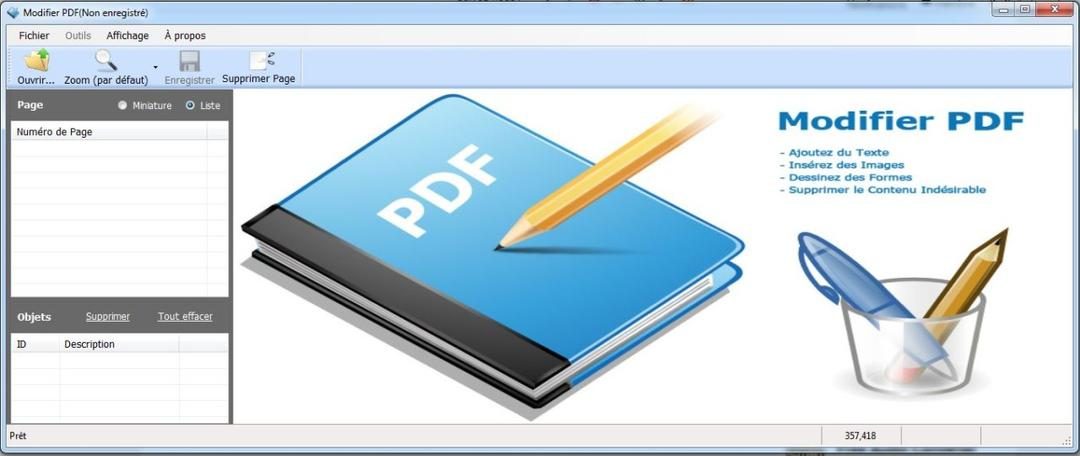
What exactly can you do? Core features focus on the essentials. You can add comments to pages. You can add and delete pages. You can prepare the form and add signature fields. Built-in document merging and splitting.
Security is handled at the document level. You can set a password. You can manage access rights. Control who can print, copy or edit files. It’s standard, but it certainly works for document management.
No specific hardware requirements are documented. Can be processed on a standard PC. It can be used even on older machines used in professional environments. The user interface is designed for Windows users. It keeps tools visible and direct.
Performance and compatibility
The user interface appears very quickly. Adding and changing text is very easy. You can also easily add images. Marking tools are available. The preservation of the layout is generally good. This is essential for reports and training materials. Visual consistency is important when sharing files with clients or colleagues.
However, there are also limitations. This software is only available for Windows. There is no MacOS version. Linux is not supported. There is no mobile app. If you work in different ecosystems, it becomes a point of friction.
Premium features are locked behind a paywall. Optical character recognition (OCR) for scanned documents is often not included in the free versions. Batch processing may be limited. Cloud integration is not deep. If you need to process hundreds of files at once, the free version may slow you down.
Complex PDFs can be tricky. Vector elements, exotic fonts, and nested forms can cause rendering issues. You may need to adjust your workflow. The documentation is useful, but doesn’t solve every edge case.
Who should use it?
This tool is tailored for specific user profiles. This is good for individuals. Suitable for students. It suits small businesses with a limited budget. The free version covers general editing needs. This way you can evaluate the software before you spend any money.
Paid licenses offer features for more demanding environments. The investment is justified if you need heavy annotation or strict permission controls. For occasional users, the freemium model is sufficient.
Download and get the latest version safely with the Futura software repository. It combines simplicity and functionality. You can reduce costs. Get a reliable editor without a bloat of enterprise suites.
The user interface remains clean. These tools do what they say they do. Converting files is fast. However, if you need cross-platform access or advanced OCR, look elsewhere. It fills the gap between basic viewing and advanced editing. It just works. Mostly.
切换云的真正成本
转移工作负载不仅仅是技术提升。 这是一场金融赌博。 大多数公司低估了隐性费用。 迁移本身是一回事。 之后保持灯亮是另一回事。
Hidden fees that kill budgets
Do you know your cloud bill? You don’t. The first month after moving is often a shock. Why? Because traditional local costs are fixed. Cloud costs vary. And it scales with your usage.
- **Data export fees. ** Moving data “out” of the cloud is expensive. AWS, Azure and GCP charge for each gigabyte transferred to the Internet or another service provider.
- **API request cost. ** Modern architectures use thousands of microservices. You pay for each API call. For perspective, these pennies can add up to thousands of dollars.
- **Storage tiering mistakes. ** Leaving hot data in premium storage is a common and costly mistake when completing work in cold storage.
“The biggest surprise is not the compute cost, but the unplanned network traffic.”
Which provider wins on price?
There is no single answer. It depends on your workload.
- AWS dominates market share. Prices is transparent, but it can be complicated. Suitable for enterprise scale.
- Microsoft Azure is tightly integrated with Windows and Office 365. It’s usually cheaper if you’re already using the Microsoft stack.
- Google Cloud Platform (GCP) is competitive in machine learning and big data. It is known for its low network egress fees.
Use tools like CloudHealth and Cloudability to compare. These platforms track costs between service providers. They report anomalies. Without these you are flying blind.
How to avoid sticker shock
- **Start small. ** Move low-risk apps first. Test billing alerts.
- **Set budget limits. ** With the cloud service provider, you can limit your consumption. Use them.
- **Right-size instances. ** Don’t over-provision. Start small. Expand as needed.
- Continuous monitoring. ** Use native tools such as AWS Cost Explorer and Azure Cost Management**.
为什么这对日常用户很重要
当公司在云基础设施上超支时,他们就会在其他地方偷工减料。 客户支持? 慢点。 新功能? 延迟。 安全? 不太严谨。
你感受到了影响。 一个缓慢的应用程序。 登录失败。 数据泄露。
云不是免费的。 在账单到达之前,它只是“看似”免费。
The verdict
云迁移不是目的地。 这是一次旅程。 而且价格昂贵。 大多数公司未能为经常性成本做好计划。 他们专注于移动。 不是维护。
如果您正在考虑shift,请计算一下。 两次。 然后再做一次。
因为云不关心你的预算。 它只关心你的使用情况。