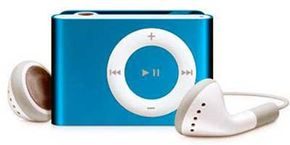
We are currently living through the latest chapter in the long, messy history of our music listening. Before the digital age, we relied on physical media. Records, 8-tracks, cassettes and CDs. None of these formats offered you the control and convenience of having an MP3 player in your hand or pocket. With a digital device, you don’t just have a song or an album with you. They maintain thousands of personal playlists. You can browse your entire library on a subway ride, at the gym or while walking the dog.
The sheer portability of these devices was the real trigger for their adoption. We’re talking hardware that, in many cases, weighs less than an ounce. Compare that to a large CD player and the jewel cases needed to make it work. Ease of transport is a key factor in MP3 files winning the format war. But the hardware has evolved beyond just sound. Modern devices started packing in video playback, photo viewing, alarms, calendar synchronization, and eventually cellular and Internet capabilities. They went from being just music players to pocket-sized command centers.
This change was not only about hardware specifications. It was about the file format itself. To understand why this technology exploded, you need to look at the MP3 file format. It is the foundation of the entire industry. Without efficient compression, the Internet would not have been able to transfer music to your device so quickly and easily. We’ll explore the technology behind these players, look at the different types available, and explain how you can manage your music library. But first, let’s talk about the code that makes it all possible.
MP3 file format
The MP3 format is not just a container. It is a method of compressing audio data without losing the quality that is most important to the human ear. This packaging makes it possible to fit thousands of songs on a small drive. It changed the economics of music distribution and the way people consume media.
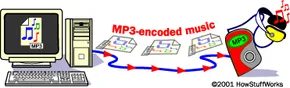
MP3 files have not only changed the way we listen to music. It disrupts the distribution model. File-sharing networks exploded in the late 1990s when the first portable MP3 players were introduced. This MPEG Audio Layer III format has become the standard. It’s part of a big family. Moving Picture Experts Group (MPEG) develops video compression systems. You can see the technology in DVD movies, high definition television broadcasts and digital satellite signals. But when it comes to sound, MP3 is a game changer.
The goal is simple. It’s all about file compression. MP3 compression reduces the byte size of your songs. Maintains almost CD-quality sound. But you lose something in the process. Compression always trades quality for size. This compromise allows you to store more music in a smaller device. This also means faster downloads. The internet was slow at the time, but the principles remained the same. Smaller files move faster.
Let’s start thinking about math. The average length of one song is 4 minutes. On a standard CD, a track needs about 40 megabytes (MB). Compressed into MP3? It was reduced to about 4 MB. This relationship is obvious. About 64 MB of storage space is needed to save an hour of music. A 1 GB MP3 player (about 1,000 MB) can hold 240 songs. This is equivalent to 20 CDs. On a CD, the sound is recorded in an uncompressed format. It takes up more space. Some recent discs support MP3 files, but original format was bulky.
MP3 is the most popular format. It’s not the only one. Many MP3 players support multiple codecs. However, not all players can handle all formats. Compatibility varies. You can also buy a player that plays MP3, but struggles with others. The following other things are also happening in the digital music ecosystem.
- WMA (Windows Media Audio) – Microsoft’s proprietary format.
- WAV (Waveform Audio) – Uncompressed, high quality, large files.
- MIDI (Musical Instrument Digital Interface) – Not audio. This is a device protocol.
- AAC (Advanced Audio Coding) – Often used by Apple. More efficient than MP3.
- Ogg Vorbis – Free, open and unpatented. A favorite of purists.
- ADPCM (Adaptive Differential Pulse Code Modulation) – Common in older games.
- ASF (Advanced Streaming Format) – Microsoft’s container format.
- VQF (Vector Quantization Format) – Developed by Toshiba. Lost the format war.
- ATRAC (Adaptive Transform Acoustic Coding 3) – Sony’s own MiniDisc technology.
Hardware is required to process these files. How does a microchip convert binary data into sound that humans can hear? Next, let’s look at the technology inside the player.
固态内存如何改变便携式音乐
忘记过去的旋转磁盘和移动磁头吧。 从 CD 和磁带到 MP3 播放器 的转变不仅仅与格式有关;而是关于架构的。 通过将易碎的机械部件替换为固态存储器,制造商创建了一种设备,该设备本质上是运行特定软件的数据存储单元。 你不只是在听音乐; 你正在播放文件。
这种与硬件无关的方法意味着播放器本质上是带有嵌入式应用程序的空白画布。 它的工作很简单:接受 MP3 文件并播放它们。 但真正的魔力发生在让您从无线电波中提取音频、翻录 CD 或从网络下载曲目的实用程序中。 一旦你有了这些文件,播放器就会将它们组织成一个播放列表 ——一个根据你的心情定制的自定义序列,而不是物理光盘的曲目顺序。
The Convergence of Standard Tech
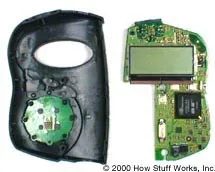
Are MP3 player components revolutionary? No, they are all off-the-shelf components. But when you put them together, you get a consumer product that defines modern portability. It’s the convergence that matters.
The operation of ordinary devices is based on certain internal organs.
- Data port for connecting to a computer
- Memory for storing files
- The Microprocessor runs the operating system
- Digital Signal Processor (DSP) is used for audio decoding
- Display For navigation
- Playback control For manual input
- Audio port plays sound
- Amplifier is used to boost the signal of headphones or speakers
- Power supply to keep it running
None of these parts are revolutionary per se. But when they come together, they create something that feels magical until you connect it. And then? It’s just data.
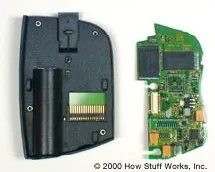
How MP3 players actually transfer data
You can connect your device to the computer via USB, FireWire or the old parallel port. The connection method determines the speed. USB transfers data much faster than parallel ports. When the file arrives, it is placed in the player’s internal memory.
Internal hardware varies greatly by model and era.
- Internal Flash Memory
–CompactFlash Cards - SmartMedia Cards
–Memory Stick - Internal Microdrive
Everything except the microdrive is solid-state. This means it has no moving parts. The result is better reliability and no more skipping when you bump your car or walk down the street.
Hard drives are a different story. Microdrive-based players can store 10-150 times more music than flash memory-based devices. More capacity. More risks. If the drive fails, the library is lost.
The Brains Behind the Beats
The microprocessor runs the show. This is the central nervous system of the device. It watches your fingers on the playback controls. It updates the LCD screen with song titles and artist name on the LCD screen.
But the real work happens downstream. The processor sends the commands to the DSP chip. DSP (Digital Signal Processor) handles the heavy lifting. It takes the compressed MP3 data and reconstruct the audio waveform. This tells the DAC exactly how to interpret the bits so that you hear music instead of static.
Without a microprocessor coordinating these signals, you’d just have a brick with a screen that lights up for no reason. DSP handles the calculations. The CPU is responsible for management. They work together to convert digital codes into analog sound waves that the ear can actually perceive.
Why is this important now? Because these same DSP technologies are built into every smartphone, smart speaker, and noise-canceling headset you own. The architecture has not changed. It’s just smaller. Cheaper. It’s hidden inside a device that can do thousands of other things.
The player is connected. The data moves. The music starts. It’s that simple. Or so it was.
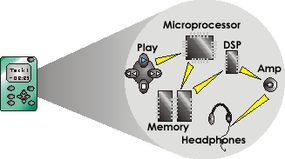
Playing a song is more than just fetching a file. This is a physical chain reaction that converts the binary code into audible vibrations. When you press the play button, the device will retrieve the compressed song from the internal storage. However, the MP3 format is a container, not the original audio itself. Players must first unpack the data.
This is achieved using a digital signal processing (DSP) engine. An algorithm (often called a decoder) decompresses the compressed bytes. This undoes the math trick used to reduce the file size in the first place. After decoding, the data becomes just a series of numbers. These numbers cannot drive a speaker. They need a translation.
A digital-to-analog converter (DAC) handles this step. It translates the discrete digital values to a continuous voltage. Analog signals are very weak. It lacks the power to move the diaphragm in your headphones or earbuds.
The amplifier fixes the problem. The voltage increases, creating a current strong enough to move the air. The result is a sound wave. You hear the music.
Powering the Portable Experience
所有这些处理都需要能量。 便携式 MP3 播放器是严格由电池供电的设备。 大多数现代迭代都依赖于内部锂离子电池。 这些电池重量轻且hold a charge well。 一次充电预计可以播放 10 到 28 小时,具体取决于型号和屏幕使用情况。
充电很少是单一方法的事情。 大多数设备都配有家用交流适配器,可直接插入墙壁插座。 许多还包括直流汽车适配器。 这样您就可以在开车时为设备充电,确保您的播放列表不会在长途通勤中die。
The Landscape of MP3 Player Types
一旦了解了硬件基础知识,市场就会分为不同的类别。 每种类型都满足不同的用户需求,从纯粹的便携性到高保真音响设置。
温和地说,数字音乐播放器市场是分散的。 您购买的不仅仅是一台设备; 你正在接受一种特定的生活方式。 正确的选择取决于您的习惯、图书馆大小和预算。 让我们将 MP3 播放器分为四大类,看看您适合哪一类。
闪存播放器
这些是紧凑型的。 没有活动部件。 只是固态存储。 这使得它们对于普通慢跑者来说几乎坚不可摧。 它们体积小、重量轻,并且通常比硬盘驱动器保存的歌曲更少。
但不要让尺寸欺骗了您。 某些型号的存储空间高达 8 GB,相当于大约 2,000 首歌曲。 另一些则将视频和照片功能结合在一起,吸引多媒体爱好者。 电池续航时间出人意料地强劲,有些设备一次充电可持续使用 28 小时。 如果您想以最小的重量和最大的耐用性离开家,这就是您的车道。
Hard disk and mini hard disk player
Hard disk players are heavy hits. Bigger, heavier and offers more storage capacity. We’re talking about devices like the Apple iPod that can store up to 80 GB. This is enough space to store your entire music library (up to 20,000 songs), as well as photos, data and video files. You can also record podcasts directly.
However, there is a problem. Moving parts consume more power. Music playback time is 8-20 hours, while video playback time is only about 6 hours. It also has a spinning disc that can fly over if handled roughly. Some models have crash buffers or jump protection to alleviate this, but the risk is still there.
Then there is the mini hard disk player. They are lighter than traditional hard drives, but have less memory, typically limited to 8 gigabytes. There are still moving parts, so the risk of jumping is still there. They’re a middle ground between flash memory and full-size hard drives, but let’s face it, this technology is becoming a niche market.
MP3-CD players and mini record players
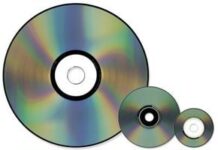
This category is a bit retro. MP3 CD players can play discs you’ve burned from your old CD collection. You need a CD burner to use these. A CD can hold about 10 hours of music. These players are cheaper than flash or hard drive models, but they are bigger. If you look at it wrong, you will be amazed.
Sony offers an alternative to the MiniDisc Walkman. It uses Hi-MD discs, can be remastered, and costs less than $10. You can store up to 600 songs. The device supports Sony’s own ATRAC3 codec, but can also handle MP3, WMA and WAV formats. This is useful when multiple files are mixed together.
These discs aren’t just for music. Save and transfer PC data such as PowerPoint presentations and spreadsheets. Battery life is impressive, with some models lasting over 30 hours on a single AA battery. This is a versatile option, but a bit outdated.
Mixer
MP3 is no longer a separate category. It blends into everything. satellite radio. PDAs. DVD player. Also sunglasses and swimming goggles. There are also Swiss Army knives with built-in MP3 players.
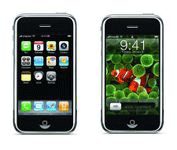
The most famous hybrid is the iPhone. It is a combination of mobile phone, iPod and web browser. It’s not just a music player anymore. This is the center. This blurring of the line suggests that dedicated MP3 players may soon be a thing of the past.
填满您的播放列表
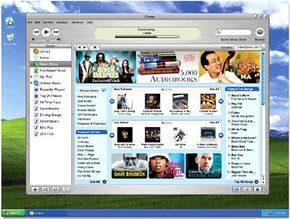
MP3 players put the power of a DJ in your pocket. You decide what plays, when it plays, and in what order. With hundreds or thousands of tracks at your fingertips, you can curate playlists by genre, artist, or pure randomness. But before you can shuffle, you need music.
Ripping CDs to Digital
If your physical CD collection is your primary music library, you need to convert those analog discs into digital MP3 files. This process relies on ripper and encoder software. While some MP3 players include this software out of the box, you can also find standalone applications that handle the heavy lifting.
The logic is simple. A ripper extracts the raw audio data from the CD to your computer’s hard drive. An encoder then compresses that data into the MP3 format, making the file small enough to transfer to your portable device.
Here is the standard workflow, though exact steps depend on the tool you use:
- Insert the CD into your computer’s optical drive.
- Select the specific track you want to convert.
- Initiate the conversion process.
- Save the new MP3 file to your hard disk.
- Transfer the file to your MP3 player.
Sourcing Music: Free, Paid, and Subscription Models
Where you get your music matters as much as how you get it. Platforms like iTunes allow you to buy individual songs. Some sites even offer tracks for free to help indie artists gain exposure. For those who want unlimited access, subscription services like Rhapsody offer a flat-fee model for streaming or downloading.
However, not all MP3 files are created equal. You will encounter two distinct types:
- Copy-protected files: These often use Digital Rights Management (DRM) technology. They prevent file-sharing and enforce subscription agreements. If your subscription lapses, these songs stop playing. They may also limit how many times you can burn them to a disc.
- Unprotected files: Sites like eMusic offer these unrestricted files. Once downloaded, you can keep them forever, share them, or move them between devices without fear of expiration.
Alternative Audio Inputs
Not everyone wants to use a computer as an intermediary. Some MP3 players feature direct recording capabilities from a CD player. This bypasses the multi-step process of ripping, encoding, saving, and transferring. The audio goes straight from the disc to your preferred playlist on the device.
Hardware variety extends further. Many units include built-in FM radio tuners. You can record live broadcasts in MP3 format and add them to your library instantly. Some devices even let you broadcast your stored MP3s over unused FM frequencies, turning your player into a low-power transmitter.
For mobile users, combo cell phone-MP3 players offer a seamless experience. You can browse catalogs and purchase songs directly on the phone, which then delivers the file for immediate playback. You can also use these devices to record your own voice, creating audio memos that can be transferred to a PC for storage or sent via email.
Podcasting and Beyond
Music isn’t the only use case. Podcasting bridges the gap between digital music players and traditional broadcasting. The term itself derives from Apple’s iPod combined with “broadcasting.” It allows anyone to create a radio-style talk show. You record your voice, convert the file to digital audio (MP3 being the industry standard), and distribute it. This democratized media format has turned listeners into broadcasters.
Accessorizing Your Setup
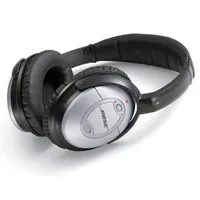
The hardware is only half the equation. To get the most out of your device, you need the right peripherals. From noise-canceling headphones to clip-on cases, the ecosystem of accessories defines the user experience.
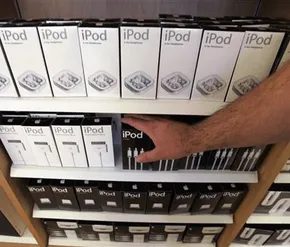
数字音乐播放器一上市,就会有一个平行的产业爆炸性地支持它。 您购买的不仅仅是硬件; 您正在购买一个配件生态系统,旨在将您的音乐塞进您生活的每个角落。 如果您想定制您携带或聆听音乐的方式,那么选择是无穷无尽的。
携带设备是第一个障碍。 爱好者可以选择从纤薄的跑步包到坚固的跑步臂带。 皮带夹让玩家可以轻松拿取物品,而无需将其伸进口袋。 但有一个实际限制:电池寿命。 对于长途通勤或户外旅行,第三方电池组是常见的附加组件。 这些外部电源可以使设备额外播放 10 小时,从而有效地将其独立效用提高一倍或三倍。
Recording and Capturing Content at Home
Radio Shark offers a special solution from analog to digital conversion via radio waves for users who spend long hours at their desks. Unlike software that only records digital content, this hardware adapter plugs into a Mac or PC and records AM or FM radio directly.
It works just like a DVR for your ears. You can schedule the recording of a certain program, pause the broadcast in the middle of a song and return at the exact time in the next hour or days. It bridges the gap between traditional broadcasts and digital libraries.
For iPod users who watch video content, Myvu Video Goggles offer a different kind of immersion. These lightweight goggles connect directly to the player and project a “floating” video image into the field of vision while transmitting sound. It claims to offer a hands-free experience on a large screen. This device includes a backpack battery that supports up to 8 hours of continuous viewing, but carrying a backpack adds weight.
Transforming the Home Audio Setup
ドッキング ステーションは、充電と増幅という 2 つの目的を果たします。 ポータブル プレーヤーをスピーカー付きベース ユニットに接続すると、すぐにミニ ステレオ システムにアップグレードできます。 音量コントロールは、デバイスの小さなボタンからスピーカーの底面にあるノブに移動します。 一部のモデルには、プレイ中にプレーヤーを充電するためのバッテリー充電器が内蔵されています。
一部の家庭では、これらのベースが従来のステレオ コンポーネントを完全に置き換えています。 この統合は非常に深いため、メーカーはドッキング ステーションを他のデバイスに組み込み始めています。 はい、MP3 ドックとしても機能するジョージ フォアマン グリルを購入すると、ハンバーガーを裏返しながら同時にプレイリストを聴くことができます。 ばかばかしい話だが、これはこれらのプレーヤーが国内市場にいかに深く浸透しているかを示している。
レガシー メディアのデジタル化を検討している場合、インスタント ミュージック オーディオ キャプチャ デバイスは古いアナログ形式の変換を処理できます。 ビニールレコードやカセットテープをデジタルファイルに変換し、MP3 プレーヤーやコンピュータに書き込むことができます。 これはアーキビストにとってはニッチなツールですが、デジタルで持ち歩きたい物理メディアが棚にいっぱいある人にとっては、本当の問題を解決します。
Listening on the Go
トランジットはリスニングのダイナミクスを変えます。 ヘッドフォンは常に理想的であるとは限らず、2000 年代初頭のカー ステレオには補助入力が欠けていることがよくありました。 ここで FM トランスミッターが登場します。 この小さなデバイスはプレーヤーに接続し、未使用の FM ラジオ周波数でオーディオをブロードキャストします。 カーラジオを放送局に合わせるだけで、車のスピーカーから音楽が再生されます。
通常、シガー ライター ソケットまたは内蔵バッテリーから電力を供給します。 これはシンプルで忠実度の低いソリューションですが、機能します。 これにより、ユーザーはデジタル ライブラリを自分向けに設計されていない車両に統合できるようになります。
Where to Learn More
The landscape of portable music is vast. If you want to learn more about the technology or compare specific devices, there are several resources that explain how it works in more detail.
- Can I use an MP3 player with methanol?
- How does the Zune compare to the iPod?
- How the iPod works
- How iPod hacking works
- How the iPhone works
- How iPod Shuffle works
- How MP3 files work
- How iTunes works
- How podcasts work
- How do I burn MP3 files from my computer to CD-R?
Sources
- “We are proud of the world’s first MP3 player.” 25 Jan 2005. CNETnews.com.
- “Emusic’s proposal: Download and own songs.” USA today. July 30, 2006.
- “Six Tips for Buying an MP3 Player with Flash Memory” Microsoft.
- “Tunning Tooting Technology: Get the most out of your MP3 player.” PC World.
- CNET Editors’ MP3 Player Buying Guide.
- The history of MP3. CNET.
- The history of MP3. About.com.